
WhatPulse Professional Release Notes
WhatPulse Professional 6.3.2
August 12, 2026WhatPulse Professional 6.3 adds window title tracking for more detailed application insights, new privacy controls, automatic project and workspace grouping, a redesigned tray popup, and a large set of reliability and data-correctness improvements.
Window title tracking
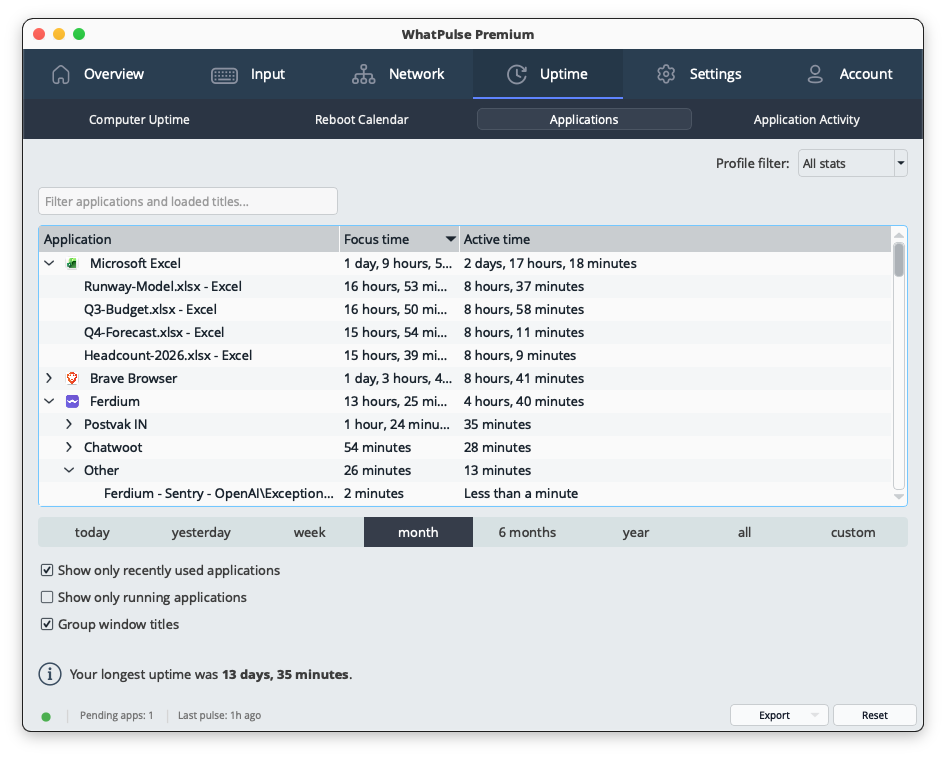
WhatPulse can now break application usage down by window title, giving you a much clearer picture of what happens inside an application.
Expand any app on the Uptime and Input > Applications pages to see the documents, browser tabs, projects, folders, and other windows being used within it. Each title includes its own uptime, keys, clicks, scrolls, mouse distance, and word counts.
A new search also makes it possible to find a window title across all applications at once.
Privacy controls for window titles
Window titles can contain sensitive information, so title tracking comes with several layers of privacy controls.
Tracking can be disabled for individual applications while continuing to collect their overall application usage. Global filters can also hide titles containing specific words or matching patterns.
WhatPulse includes ready-made filters for email addresses, credit card numbers, and login information found in web addresses. Titles from incognito and private browser windows are always hidden.
Group titles into projects and workspaces
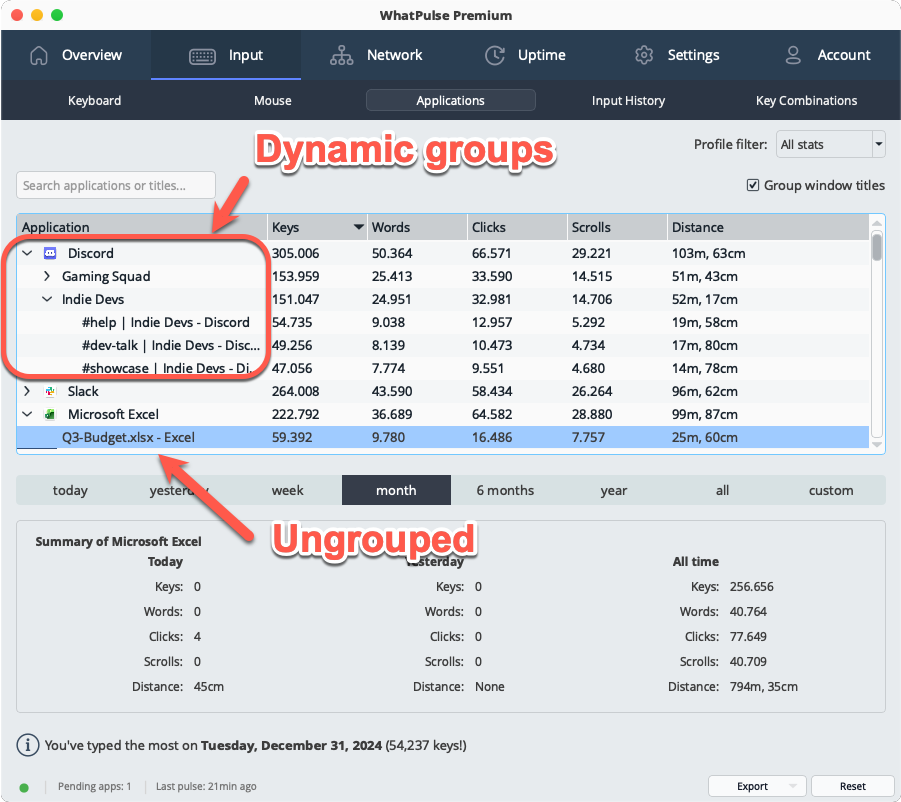
Applications can generate hundreds of individual window titles, so WhatPulse can automatically group related titles into more useful projects and workspaces.
This includes VS Code workspaces, IDE projects, Outlook folders, and similar application-specific groups. Grouping is calculated in real time on the Uptime and Input > Applications pages and can be switched on or off per page.
Search results remain ungrouped, making it easy to locate a specific title regardless of which project or workspace it belongs to.
Redesigned tray popup
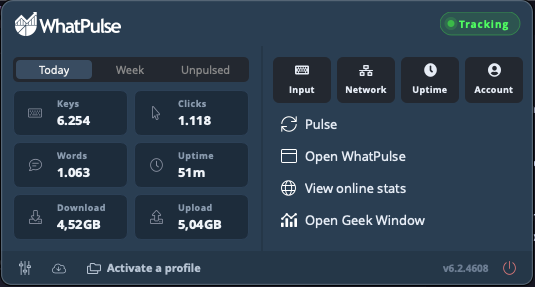
The WhatPulse tray menu is now a compact stats dashboard.
A new grid shows Keys, Clicks, Words, Uptime, Download, and Upload, with quick switching between Today, Week, and Unpulsed statistics.
Existing actions such as Pulse, opening WhatPulse, viewing online statistics, switching profiles, and opening the Geek Window remain available in the redesigned layout.
Reliability and data accuracy improvements
This release also includes a substantial number of fixes aimed at keeping collected statistics accurate and monitoring reliable:
- Fixed applications missing from online statistics. Some applications, particularly newer ones, could be tracked locally but never appear in online statistics when a computer had a large number of applications.
- Fixed statistics stopping after waking from sleep. If a laptop’s network adapter took several seconds to reconnect after waking, monitoring could remain stopped even after connectivity returned. WhatPulse now keeps retrying until the connection is restored.
- Improved keyboard heatmaps for non-QWERTY layouts. AZERTY, QWERTZ, Dvorak, Colemak, and other layouts now map keys more accurately on Windows and macOS, including punctuation-position letters, dead keys, and the number row.
- Closing WhatPulse is now smoother and more reliable, fixing cases where the application could briefly hang or crash during shutdown.
- Fixed the Uptime page not showing new data for the All time period when left open past midnight.
- The Input > Key combinations table now expands with the window rather than stopping at a fixed height.
- The milestones log is now limited to the most recent 100 records instead of growing indefinitely.
Settings and interface improvements
The Settings screen has received a broader cleanup, particularly around exclusions and other configurable lists.
Application exclusions now use a single list with a type selector, while network interfaces, Web Insights exclusions, window title filters, profiles, and milestones use the same consistent, searchable table design.
User-initiated application updates also now display a small progress window showing the download, installation, and restart process. Automatic background updates remain silent.
Other changes
- Added the new Pulsar desktop avatar Geek Window style, including support for custom avatar packs.
- WhatPulse is now available in Serbian, in both Cyrillic and Latin scripts.
Upgrade to WhatPulse Professional 6.3.2
WhatPulse Professional 6.3.2 gives you more detail about how applications are actually being used while retaining control over what information is collected. Alongside window title tracking, this release focuses heavily on making long-running monitoring more reliable and the resulting statistics more accurate.
We recommend updating your WhatPulse Professional clients to 6.3.2 to take advantage of the new insights and fixes.
WhatPulse Professional 6.2.2
June 03, 2026This release brings several months of improvements to the WhatPulse desktop application, including faster updates, improved deployment workflows, new activity metrics, a redesigned activity history interface, and a wide range of stability improvements.
Word counting
WhatPulse can now measure the number of words typed on a device, providing an additional activity metric alongside keyboard and mouse usage.
No text or content is stored. Word counts are calculated locally from typing patterns and only aggregate totals are transmitted to WhatPulse Professional.
Word count data is available throughout the platform, including dashboards, reports, exports, and application usage statistics.
Dynamic keyboard heatmaps
Keyboard heatmaps now automatically detect the active keyboard layout and adjust key positions and labels accordingly.
This improves accuracy for international teams and users working with non-standard keyboard layouts.
Pause data collection
Users can now temporarily pause data collection directly from the system tray menu.
When paused, keyboard, mouse, application, and website activity are not collected or uploaded. The application clearly indicates when collection is paused to avoid confusion.
This feature provides additional privacy control for users who may be working with sensitive systems, confidential information, personal accounts, or activities they do not want included in organizational reporting. Activity that occurs while collection is paused is not tracked and is not uploaded later when collection resumes.
Redesigned activity history
The activity history interface has been rebuilt with a more flexible and interactive experience.
New capabilities include:
- Improved charts and visualizations
- Interactive legends
- Flexible date range selection
- Grouping by hour, day, week, month, or year
These improvements make it easier to review activity trends across both short and long time periods.
Faster application updates
Windows and macOS now use a patch-based update system.
Instead of downloading the full installer for every update, the application can download and apply smaller update packages. This reduces bandwidth usage, shortens update times, and makes organization-wide updates less disruptive.
Improved deployment and onboarding
The login and enrollment experience has been redesigned to provide clearer guidance during setup.
Additional improvements include:
- Proxy configuration during initial setup
- Improved account and organization messaging
- Better handling of application restoration and recovery scenarios
Additional improvements
- Mouse heatmaps now respect application exclusions.
- Searchable application filtering has been added to keyboard heatmaps.
- Dashboard synchronization behavior has been optimized to reduce delays after frequent device restarts.
- Native Wayland support for Linux AppImage deployments.
- User interface refinements throughout the application, including improved controls and navigation.
Stability and reliability improvements
This release also includes a large number of bug fixes and reliability improvements, including:
- Resolved duplicate application entries caused by versioned installation paths.
- Fixed issues affecting mouse heatmap accuracy on some Windows systems.
- Fixed application upload loops in certain edge cases.
- Improved handling of proxy configuration persistence.
- Reduced CPU usage during Windows startup in specific scenarios.
- Fixed rendering issues in realtime network charts.
- Numerous crash fixes and stability improvements based on customer feedback and telemetry.
We recommend updating all installations to benefit from the latest reliability, performance, and reporting improvements.
Preview: Meet Pulsar, your AI data analyst for WhatPulse Professional
May 28, 2026Today, we’re releasing a preview of Pulsar, a new AI-powered assistant built into WhatPulse Professional.
Pulsar gives your team a faster, more natural way to explore activity data. Instead of digging through dashboards and reports, you can simply ask questions in plain English and get answers based on your real WhatPulse data.
Whether you want to review your own work patterns or understand activity across your organization, Pulsar helps surface insights in seconds.
Ask questions about your work and activity
Pulsar can help answer questions like:
- What applications did I spend the most time in this week?
- How does my activity compare to last month?
- When am I most active during the day?
- Which computers have been online recently?
- What are the most-used applications across the organization?
- Which team members have been the most active this week?
Admins and organization owners can also explore organization-wide insights, while team members only have access to their own data.
Built around your real WhatPulse data
Pulsar uses your actual WhatPulse statistics and activity data to generate responses. It does not invent numbers, and responses always double-check the data.
You can continue asking follow-up questions naturally to explore trends, compare time periods, or drill deeper into specific applications, websites, or activity patterns.
Privacy controls built in
Organization administrators stay in control of what Pulsar can access. Individual categories like activity summaries, application usage, website usage, and computer names can all be enabled or disabled independently in the Insights settings.
Conversations are private to each user.
Preview availability
Pulsar is currently available as a preview feature inside WhatPulse Professional. While we’re getting our bearings, paid organizations receive 200 Pulsar messages per month shared across their organization, while trial organizations receive 20 messages per month during the preview period.
To try it out, just head to the Insights page in WhatPulse Professional and click “Ask Pulsar”. We can’t wait to see what you ask! Please share your feedback and suggestions with us as you explore the possibilities.
Search & Websites
March 23, 2026Websites are now part of search in WhatPulse Professional. Open the command palette with Cmd+K / Ctrl+K and start typing to instantly find any tracked website across your organization.
Select a website from the results to jump straight into its dashboard, where you can review usage, activity, and trends without digging through menus. It’s a faster way to get from question to insight.
New: WhatPulse Professional API
March 16, 2026The WhatPulse Professional API is now available!
Organizations can now retrieve usage data programmatically from the WhatPulse portal, including computers, users, applications, websites, and activity metrics.
This allows teams to build:
- custom dashboards
- BI integrations
- automation workflows
- software license analysis tools
We’ve also published full documentation for the Client API, which allows local applications to interact directly with the WhatPulse desktop client.
Documentation is available in the help center.
WhatPulse Professional 6.0.2
February 23, 2026WhatPulse Professional 6.0.2 brings Web Insights, a more flexible UI, better stability. Plus a series of targeted fixes for managed and enterprise deployments on Windows and macOS.
Web Insights: website activity tracking
Web Insights introduces website-level activity tracking through browser extensions, integrating browsing activity directly into WhatPulse.
- Track time spent and activity on websites, including keys, clicks, scrolling, and mouse movement
- View website activity alongside applications inside the WhatPulse app
- Associate website stats with profiles to separate work, personal, or other contexts
- Exclude specific websites or patterns from tracking
- Export website activity data for deeper analysis or reporting
- Privacy-first by design:
- Only website domains are tracked; never full URLs or page content
- Browser extensions don’t run in private or incognito mode
- Website stats are private and never publicly visible
Browser extension pairing can be auto-approved via settings-overrides.ini for managed deployments with pre-installed extensions. Learn more about (automatically) deploying the extension here.
Web Insights in the Portal: organization-wide website visibility
Web Insights data is now available directly inside the WhatPulse Professional portal. Administrators can view aggregated website usage across the organization, including:
- Total time and activity per domain
- Keys, clicks, and engagement metrics
- Website metadata such as tags, categories, and productive/non-productive classification
- Usage trends over time
From the organization overview, you can drill down into individual users and profiles to see website usage at a granular level, fully integrated with application activity dashboards.
Managed deployment improvements
- Standardized Windows startup on registry keys — Task Scheduler is removed entirely; startup now uses HKCU (single-user) or HKLM (all-users/installer-managed) registry keys
- Automatic migration from legacy Task Scheduler and lowercase registry entries on first run after upgrade
- Installer sets
startup_managed_by_installerflag insettings-overrides.iniso the app skips startup management
- Fixed MSI installer issues:
- MSI now installs as proper 64-bit (no longer writes to WOW6432Node)
- Fixed HKLM startup registry entry not being created
- Fixed all-users install being enabled regardless of checkbox state
- Fixed launch-on-startup being immediately disabled after enabling (case-insensitive registry key collision)
- OS username included in client authorization requests so admins can identify which machine user is requesting authorization (portal integration to come in the future)
- Computer serial number included in
upload_computerinfofor asset tracking (portal integration to come in the future)
UI and usability improvements
- The main window is now fully resizable and remembers its size and position
- Application Activity charts include forward and backward day navigation
- Dialogs, buttons, and confirmations polished throughout the app
- New application sync status window with detailed logging
- Time series handling separated from pulsing, so dashboard data is not interrupted by sync delays
Stability and performance
- Keyboard and mouse heatmaps render in the background to avoid UI freezes
- Better detection of hardware, input devices, and network interfaces on newer Windows versions
- Improved handling of unusual display and multi-monitor configurations
- Hardened cleanup across network monitor, browser extension server, database, and heatmap components
macOS
- Safer GeoIP database updates (no more file overwrite crashes)
- Fixed timestamp bug that could cause timezone-related crashes
- Standalone
.pkginstaller for MDM/enterprise deployment
Windows
- Third-party shell extensions (e.g. OneDrive, Dropbox) no longer crash icon retrieval
- Improved MSI uninstall cleanup — WhatPulse process is now cleanly shut down during uninstall
Client API
- New
/v1/idleendpoint exposing WhatPulse’s internal last-input timestamp for accurate idle detection by third-party tools - Idle status also included in
/v1/all-statsand websocket updates
Reports (Preview)
January 29, 2026A new Reports section is now available, giving you out-of-the-box insights into your organization’s devices, activity, and productivity. No setup required, with exports available for deeper analysis.
Available reports:
- Hardware Inventory — See all your devices at a glance with CPU, RAM, GPU specs, and OS distribution.
- Offline Devices — Identify devices that haven’t checked in, with configurable offline thresholds and days-offline tracking.
- Kiosk Usage — Analyze computer utilization with average daily focused time and a low-utilization flag for consolidation candidates. Optionally filter to workday hours only.
- New Applications — Discover newly installed applications across your fleet within any date range.
- Project Time Tracking — Break down time spent per shared profile across your team, with session counts and activity metrics.
- Trend Changes — Compare keystrokes, clicks, or uptime between periods to spot usage trends at the computer or organization level.
Every report includes summary cards, a chart visualization, a sortable data table, and CSV export. Use the filters at the top of each report to narrow results by date range, OS, metric, and more.
Reports is currently in preview and we’d love to hear your feedback!
New: Global search
December 18, 2025Global search is now available in WhatPulse Professional.
You can quickly find users, computers, and applications across your organization from anywhere in the app. Open search with ⌘K (Mac) or Ctrl+K (Windows/Linux), start typing, and jump straight to what you’re looking for, no extra clicks.
Search respects permissions, updates in near real-time, and works just as well for daily navigation as it does for admin tasks.
WhatPulse Professional 5.11.2
November 20, 2025WhatPulse Professional 5.11.2 introduces Focused Time along with several improvements to reliability, performance, and application syncing.
New ✨
- Focused Time: More accurate measurement of active computer use based on typing and mouse activity.
- Per-application: Detailed breakdown of active time across applications.
- Focused time is also tracked throughout the use of the time tracking profiles.
- Status Bar: New optional status bar showing collector status, last pulse details, and pending app syncs.
Improvements 📈
- Faster client startup and improved UI responsiveness.
- More precise application usage timing (millisecond resolution).
- Cached application icons for faster app list loading.
- Smoother, clearer application syncing (notably on macOS).
- Improved layout spacing, tooltip visuals, and UI consistency.
- Sharper icons on recent macOS versions.
- More reliable behavior of the Geek Window on multi-monitor setups.
- Smarter database version compatibility messages.
- Better version sync with the Professional dashboard after upgrades.
- Correct display of large network usage values.
Fixes 🐞
- Fixed inaccurate key-combination counts caused by stuck modifier keys.
- Multiple stability fixes around shutdown, window lifecycle, and rapid UI interactions.
Hourly activity view
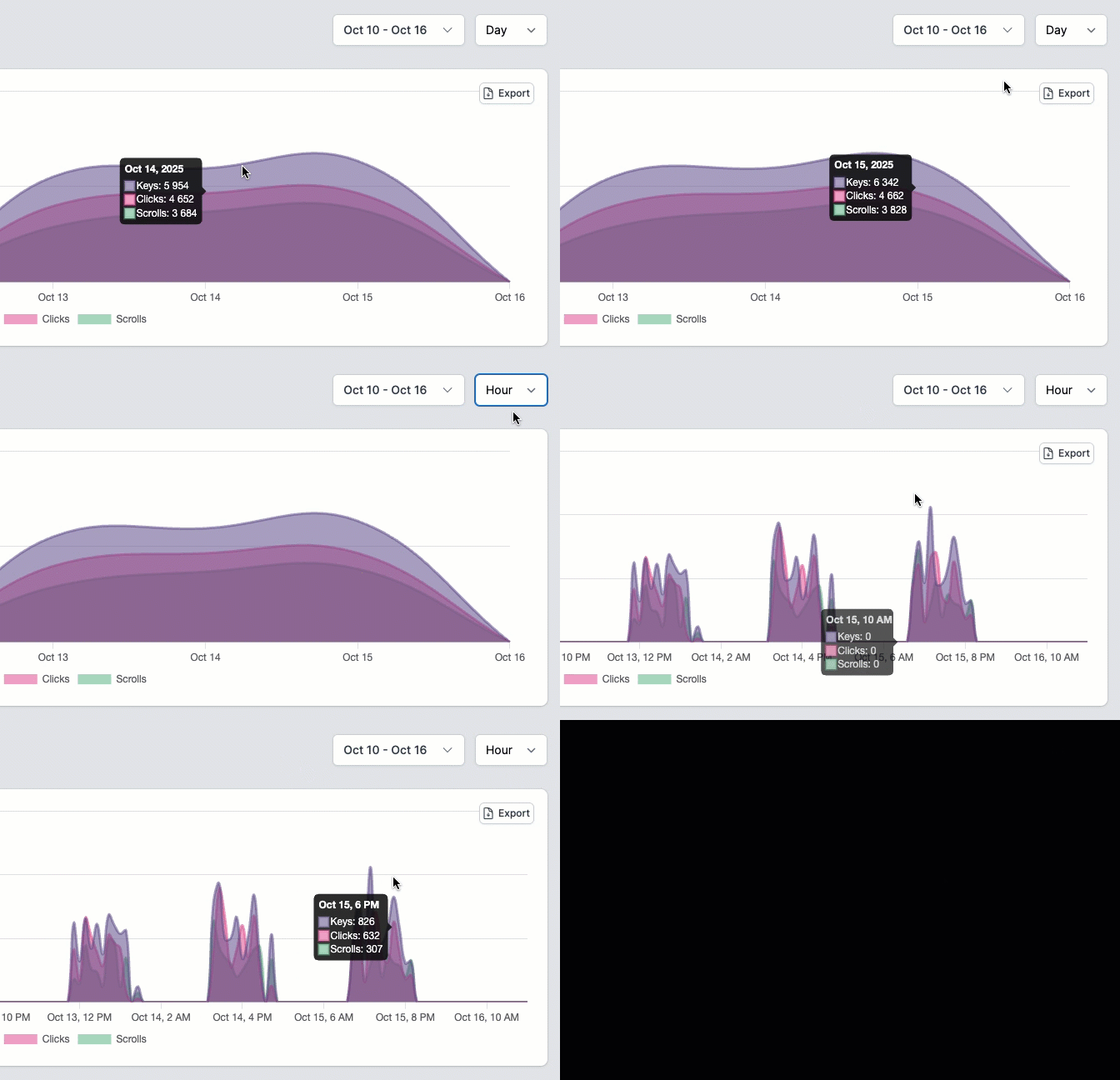
October 16, 2025You can now zoom in to see hourly activity on any dashboard chart! Open a chart and switch the grouping from day to hour to explore detailed patterns across users, computers, or groups. It’s a great way to spot daily trends and see exactly when activity peaks. When you export the chart, the CSV will use the same hourly granularity you’ve selected.
Exporting chart data
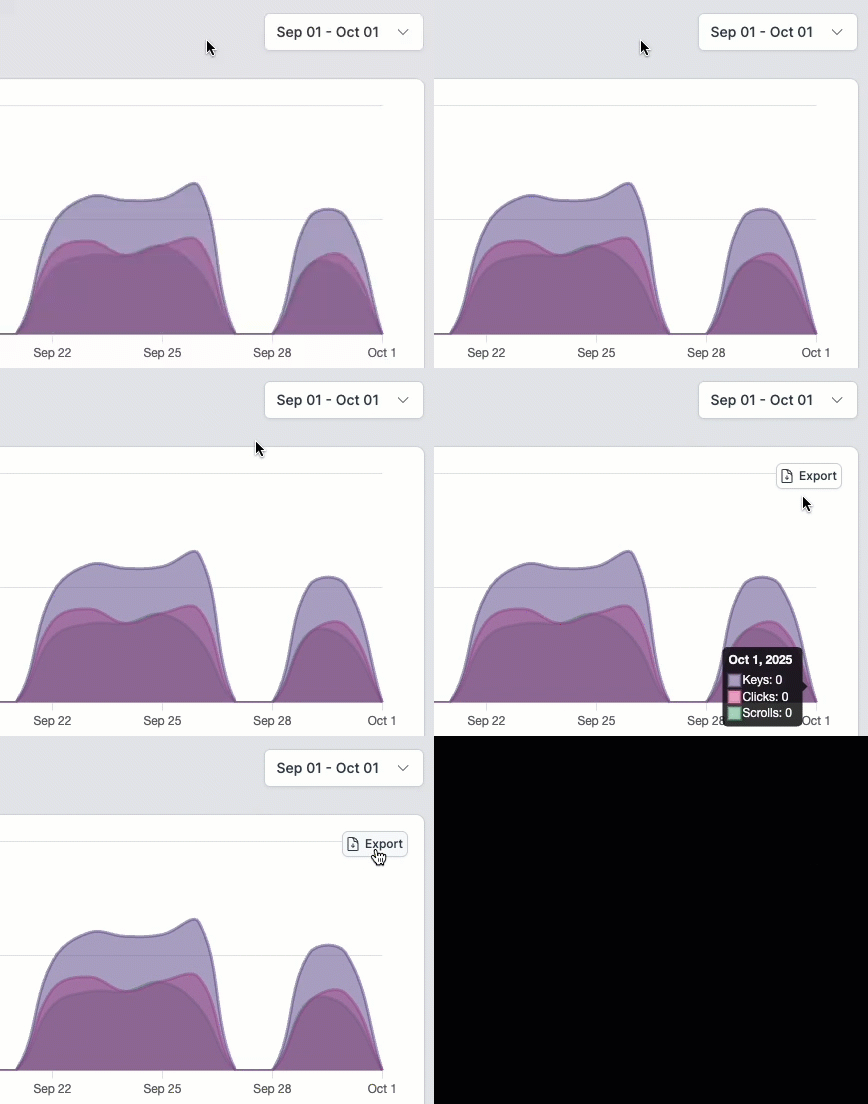
October 01, 2025You can now export the data behind any chart on your dashboard! Just hover over a chart to reveal the export button. Click it, and you’ll get a CSV file with all the data and metrics from that chart.
WhatPulse 5.10.3
July 31, 2025This update brings a few quality-of-life improvements, bug fixes, and under-the-hood changes to improve stability and future compatibility.
🪄 Improvements
- The setup wizard now has its own window, making the setup and main interface simpler.
- The Geek Window stats
%TotalDistance%and%TotalScrolls%now reflect account totals correctly, not just the current computer’s stats. - The network time series for computers with multiple interfaces has been fixed to sum the data correctly, ensuring accurate historical data. This applies to the time series currently used in the Discord leaderboards.
- Fixed a few memory leaks when opening the main window repeatedly, which will slightly reduce memory usage over time.
- Fixed a few possible crashes when exiting WhatPulse with the main window still open. You were closing WhatPulse anyway, so these weren’t really a problem—but still worth fixing.
WhatPulse Professional updates
- Improved compatibility for Nuance PowerScribe.
- Streamlined the Professional interface by removing buttons that only apply to the Community version (such as share buttons, online profile link, change password, etc.).
- Clicking “Open Online Stats” now takes you to your Dashboard for a more integrated experience.
- The release notes link now points to the new whatpulse.pro/releasenotes page when there’s a new version.
🔍 New: Audit logs
July 25, 2025We’ve added an organization-wide audit log to give you clearer oversight of everything happening in your WhatPulse Professional account. Admins and owners can now view a complete timeline of key events: computer assignments, settings changes, logins, password changes, and more—with full context like IP addresses, browser details, and timestamps.
Need to verify who made a change? Check. The audit log is searchable, easy to navigate, and available right from your sidebar. It’s a simple way to stay informed and accountable without extra overhead.
WhatPulse 5.10.1 Professional
July 07, 2025🚀 New
Multi-monitor mouse heat map support
Mouse activity is now mapped across multiple screens, allowing for per-display heat maps. You can analyze each monitor individually or review the entire setup at once. Heat map rendering has also been visually refreshed for better clarity.
Extended Application Activity history
The Application Activity chart now supports scrolling beyond the 24-hour default, making it easier to review usage patterns and behaviors over time—ideal for weekly or multi-day productivity analysis.
Updated dark mode UI
Dark mode has been visually aligned with the current WhatPulse design system. The updated theme improves visual clarity and reduces eye strain during extended usage.
🔧 Improvements
Separate internet vs. local traffic tracking
Network traffic is now categorized internally as either local or internet. While this won’t appear in the UI just yet, the separation is already reflected in exported data—useful for teams conducting bandwidth audits or compliance reviews.
Reintroduction of full packet capture (PCAP)
WhatPulse now captures network data using full packet capture instead of OS counters, improving reliability. The network capture engine also includes: a 256MB packet buffer, immediate mode enabled, NIC buffering enhancements
Together, these updates improve performance and enable accurate monitoring of high-throughput connections up to 10Gbit/s.
Database and performance optimizations
- The app loads significantly faster, even with multi-year datasets.
- Database integrity checks are now performed weekly, with automatic repair routines for structural issues.
- A smarter caching mechanism improves responsiveness across charts and reports.
Additional updates
- Game controller input: Gamepads from Sony, Microsoft, Nintendo, 8BitDo, and others are now auto-detected and correctly mapped—ensuring accurate input tracking across devices.
- Keyboard heat map: Application grouping is improved, and tooltips now display the full executable path for each item.
- Better resilience during system sleep/wake cycles: duplicate event protection and more robust startup checks reduce the chance of crashes.
- Network request handling is more stable, with request timeouts and automatic recovery from stalled network states.
- Upgraded to Qt 6.9.1 on Windows and macOS, improving compatibility and access to modern platform features.
- Linux improvements: Correct theme detection, smoother window behavior on GNOME, properly positioned toolbar buttons, and improved display detection for mouse tracking.
- Upgraded embedded SQLite version for better performance and smaller log file size.
- Move client communication to app.whatpulse.pro from whatpulse.pro. Same external IP addresses, only different hostname.
🐛 Fixes
- Windows: Resolved an issue where some update checks mistakenly triggered a UAC prompt.
- Fixed incorrect global stats caused by deleting a local profile.
- Corrected a visual bug where updates didn’t appear to complete when the MaintenanceTool was also updated.
- Fixed lingering mouse button data in the Mouse Details page when switching between time ranges.
- Eliminated false mouse clicks at coordinate (0,0) from the heat map display.
- Uptime chart no longer stretches the Y-axis when a day has no data.
- Improved styling for startup error messages to ensure readability during critical failures.
- Time series data for network activity now groups correctly by hour and day on multi-adapter systems (feature not yet exposed in the UI).
- The embedded Swagger API interface now renders correctly instead of returning JSON headers.
Merging computers
June 30, 2025You can now merge multiple computers into a single record. This helps when upgrading or moving hardware, or cleaning up duplicate entries.
The merge combines all stats, app data, and history from a source computer into your target computer—keeping your data intact. Start by clicking the new “Merge” button on any computer’s detail page.
CSV Exports
May 18, 2025New: CSV Exports
You can now export data in CSV format from the Computers, Users, Applications, and Pulses sections.
- Exports include all matching data, not just what’s visible on screen.
- Supports filters like search terms, tags, and date ranges.
- Perfect for reporting, analysis, and working with your data in Excel, Google Sheets, or BI tools.
Available today for all organizations—admins can export everything, users can export their own data. Look for the Export CSV button in your dashboard, or learn more in our help center.
Tag-powered application insights
March 14, 2025Ever wondered which apps your marketing team is really using all day? Now you can filter application usage data by computer tags to see exactly who’s doing what. Compare teams, analyze departments, or finally catch which office is spending too much time on cat videos.
Learn more in the Help Center
Computer tags: Organize like a pro
March 14, 2025You can now add tags to your computers (like “Marketing,” “Engineering,” or “That One Machine That Always Crashes”) making it easier to organize and filter your fleet. Perfect for creating teams, tracking departments, or just satisfying your inner organizer.
Learn more in the Help Center
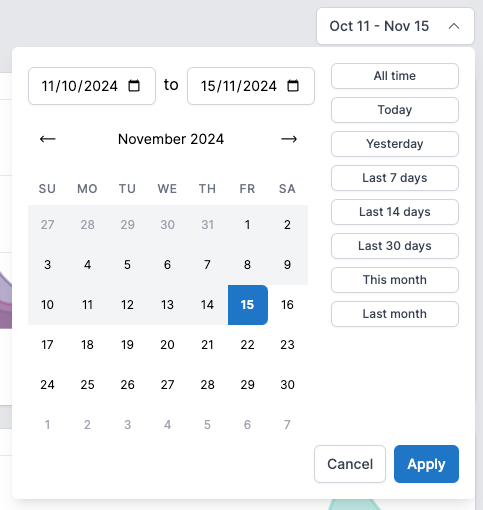
New date range box
November 15, 2024It’s now easier than ever to get data for a specific date range! The new date range widget lets you quickly pick standard date ranges, or select a custom range in a single view:
Finding your organization ID
November 08, 2024After the initial onboarding, it was a bit difficult to find your organization ID for subsequential WhatPulse app installs. Not anymore! Find (and quickly copy to clipboard) your organization ID on both the Downloads page and the Organization settings page.