
It's a familiar story: a software project fails, and the post-mortem points to technical debt or missed deadlines. But often, the project was doomed before a single line of code was written.
The real cause is usually a weak foundation—one built on vague ideas and mismatched expectations. A project that kicks off with "we need a new dashboard" is already in trouble. One that starts with "our support team spends 20% of their day manually compiling reports, which delays customer responses" is on the right track.
This initial work—defining the problem, identifying who's involved, and agreeing on what 'done' looks like—is what prevents scope creep and ensures everyone from developers to executives is aiming at the same target.
Building a Foundation That Prevents Failure

The first step is to nail down a clear and concise problem statement. This isn't just a job for the product manager. Everyone, from the CEO to the junior developer, must understand the exact 'why' behind the project. A well-defined problem becomes the guidepost for every decision that follows.
Identify the Right Stakeholders
Your stakeholders aren't just the people who control the budget. They're anyone affected by the project's outcome—end-users, the support staff who will field questions, and the finance team who will handle billing.
Look beyond the loudest voices in the room. Often, the most useful insights come from people on the front lines who wrestle with the problem every day.
Your stakeholder group should include a mix of:
- Decision-Makers: The people who approve budgets and have the final say.
- End-Users: The ones who will actually use the software. Their input on usability is non-negotiable.
- Technical Leads: The architects and senior developers who can speak to technical feasibility and constraints.
- Subject Matter Experts (SMEs): People with deep knowledge of the business process you’re trying to improve.
Get these people together for a kickoff meeting. The goal isn't to walk out with a massive to-do list, but to get agreement on the problem and the high-level goals.
Run a Kickoff Meeting That Matters
A good kickoff meeting produces a shared understanding, not just a list of action items. The agenda should be tight, focused on defining the project's boundaries and what success looks like.
Start by presenting the problem statement and opening the floor. Is this the real issue? Are we missing any context? This one conversation can save weeks of wasted effort.
From there, work together to create a high-level project charter. This doesn't need to be a 20-page document; it just needs to be concrete.
A project charter is a simple document that outlines the project's objectives, identifies the main stakeholders, and defines the authority of the project manager. Think of it as the project's constitution—it sets the rules of engagement.
This charter must contain a preliminary 'definition of done'. This is a clear, objective set of criteria that tells you when the project is complete. A vague goal like "the new system is live" is an invitation for endless scope creep.
A specific definition, like "users can successfully process an order, the system handles 100 concurrent users with a response time under 500ms, and all automated tests pass," leaves no room for ambiguity.
Finalizing this foundation—the problem statement, the stakeholder group, and the definition of done—is the most important thing you'll do. It turns a fuzzy idea into a tangible plan with clear expectations.
Defining Scope and Gathering Requirements That Matter
A project without a clear scope is like a road trip without a map. You might end up somewhere interesting, but it won't be where you intended to go. Scope creep is the quiet killer of timelines and budgets, turning well-intentioned projects into an endless march.
The only way to protect your project's boundaries is to define them clearly from the start. This isn't about creating a hundred-page document nobody reads. It's about translating broad business needs into specific, testable requirements that developers can actually build. A big part of this is knowing how to write technical requirements effectively, as this is what bridges the gap between a business idea and a functional product.
Get Brutally Honest with the MoSCoW Method
One of the best ways to build a clear, prioritized list of features is the MoSCoW method. It's a simple framework that forces everyone involved to make tough decisions upfront, rather than halfway through a sprint when the pressure is on.
The method categorizes every potential feature into one of four buckets:
MoSCoW Prioritization Framework
| Category | Description | Example Feature (E-commerce Site) |
|---|---|---|
| Must have | Non-negotiable requirements. The launch is a failure without them. | A functioning checkout process. |
| Should have | Important but not critical for launch. Adds value but can wait. | Customer product reviews. |
| Could have | Desirable "nice-to-haves". Included only if time and resources permit. | "Customers also bought" suggestions. |
| Won't have | Explicitly excluded from this project. Just as important as defining what's in. | A customer loyalty points system. |
This approach is good for managing expectations. It gives you a clear framework for making decisions when deadlines get tight or resources are stretched. For a deeper dive into managing your project's boundaries, you can explore our full guide on defining the scope in a project.
From Business Needs to User Stories
Broad goals like "improve the user dashboard" are too vague to be useful. They need to be broken down into something tangible that a team can tackle. This is where user story mapping is useful.
A user story is an informal, simple description of a feature from the perspective of the person who wants it. The format is straightforward:
"As a [type of user], I want to [perform some action] so that I can [achieve some goal]."
For instance: "As a marketing manager, I want to filter the user list by sign-up date so that I can create targeted email campaigns." That’s a concrete requirement a developer can understand and start working on.
A well-defined requirement is a testable one. If you can't write a test case for it, it’s not specific enough. "The page should load fast" is just a wish. "The page must load in under 2 seconds on a 4G connection" is a real requirement.
Validate Your Assumptions with Real Data
Before you commit your team's time to building a new feature, you need to validate the underlying assumption. Is this a real problem for your users, or just an idea from a brainstorming session?
Privacy-first analytics tools can give you the answer without compromising user trust. By looking at aggregated, anonymous usage data, you can see how people are interacting with your application right now.
- Are users constantly jumping between two specific screens? That might point to a workflow that could be smoother.
- Is that feature you thought was essential almost never being used? Maybe it’s not as important as you assumed.
- Are people spending ages on a particular form? It could be confusing or inefficient.
This need for clarity and control is why project management software is seeing a surge. In the Netherlands alone, the market is expected to grow by 19.42% between 2024 and 2029, hitting a value of $12 billion. This growth is all about the demand for better project visibility and execution.
Using real data to inform your requirements moves planning from guesswork to an evidence-based process. It ensures you invest development effort into solving actual problems and delivering value that your customers will notice.
Choosing Estimation and Scheduling Methods That Work
Project estimates are guesses. But they don't have to be wild, finger-in-the-air guesses. Practical estimation techniques can bring some realism to the planning process and build trust with stakeholders.
There’s no single "best" method. The right choice depends on your team's maturity, the project's complexity, and how much uncertainty you're facing. Trying to slap a rigid, time-based estimate on a highly innovative, undefined feature is a recipe for failure.
Comparing Common Estimation Techniques
Here are three common approaches I've seen teams use. Each has its time and place.
- Ideal Developer Days: This one is straightforward. You estimate work based on how long a task would take a developer with zero interruptions. The team then uses a 'velocity' metric to translate these ideal days into real calendar days, accounting for meetings, coffee breaks, and all the other non-coding time. It's direct but can be brittle; one unexpected issue can throw the whole schedule out of whack.
- Story Points: This is a more abstract method, often using a Fibonacci-like sequence (1, 2, 3, 5, 8...). Points represent a mix of effort, complexity, and uncertainty. A '5' isn't five days; it's just bigger and more complex than a '3'. This decouples estimates from hours, which is good for focusing conversations on relative size rather than getting cornered into promising exact timelines for tiny tasks.
- T-Shirt Sizing: For early-stage planning or massive epics, this is perfect. You categorize features as Small (S), Medium (M), Large (L), or Extra-Large (XL). It’s fast, helps you avoid getting bogged down in details too early, and works for high-level roadmapping.
Of course, before you even get to estimation, you need to be sure you're working on the right things. The decision tree below shows how you might think about prioritizing features.
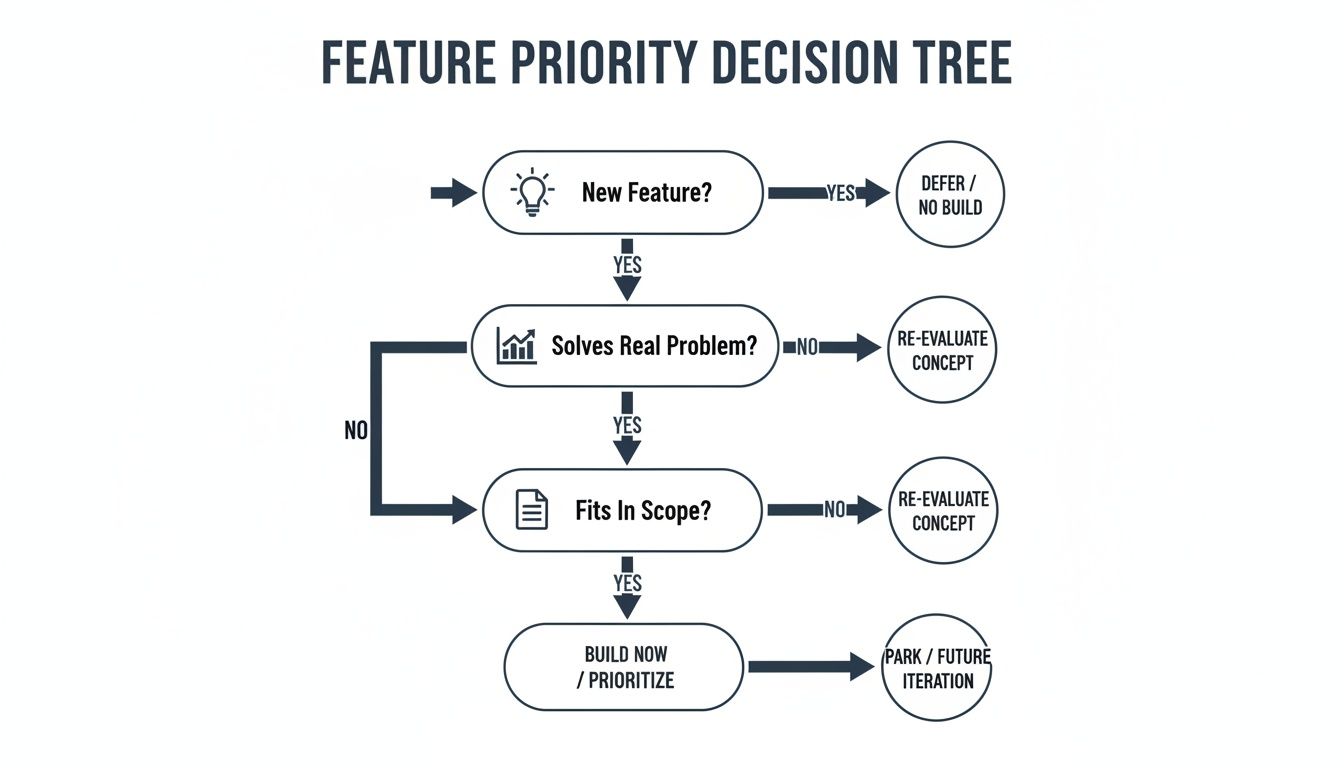
It’s a simple idea: a feature must solve a real problem and fit within the agreed scope before it's even worth estimating.
Building Schedules That Embrace Uncertainty
The biggest mistake in scheduling is creating a rigid Gantt chart with exact dates stretching months into the future. It looks impressive in a meeting, but it’s fragile. One small delay creates a domino effect of missed deadlines and broken promises.
A more robust approach is to build schedules that acknowledge uncertainty. This means shifting away from single dates and toward probabilistic forecasts. Instead of saying, "Feature X will be delivered on 15 March," you communicate a range: "We're forecasting Feature X will be ready between 10 March and 25 March."
This single change transforms the conversation with stakeholders. It moves from a brittle promise to a more honest discussion about confidence levels and risk. It's the difference between setting your team up for failure and building a plan grounded in reality.
To make this work, build in buffers. These aren't just random padding; they are intentional blocks of time allocated to address known risks. For example, if you're integrating with a poorly documented third-party API, you should explicitly add buffer time to the schedule to handle the inevitable troubleshooting. You can refine this process further with techniques like Earned Value Management, which helps track progress against the plan in a more nuanced way.
The goal is a flexible release plan. You might have a fixed date for a major release but allow the scope within it to be flexible. The "Must Have" features are locked in, but the "Should Have" and "Could Have" items are candidates to be moved to the next release if something more important runs into trouble. This gives your team a way to hit deadlines without compromising on quality or burning out.
Optimising Resources and Managing Your Tech Stack
When we talk about "resources" in a software project, it's easy to think only about developers. But the real picture is much broader. It includes the cloud infrastructure running your application, the IDEs your team relies on, and the software licences you pay for every month.
Smart resource allocation means looking at the full picture—people, tools, and budget—and making sure they all work together efficiently. This is necessary when talent is scarce and software costs are climbing. Your plan needs to account for the skills you have on your team and spot any gaps before they derail a project.
Navigating the Talent Squeeze
The tech talent shortage in the Netherlands has a direct impact on how we plan projects. While IT vacancies dipped slightly to 31,435 in 2024, a significant 21% of Dutch firms still find it tough to fill key technical roles. At the same time, software developer salaries shot up by 11%.
This reality means you can't just hire your way out of a tight deadline anymore. The focus has to shift from growing the team to optimizing the productivity of the people you already have. That starts with understanding where their time is actually going.
A team that spends 15% of its week wrestling with a slow CI/CD pipeline or a clunky staging environment has a resource problem. These are the kinds of bottlenecks that a good project plan should identify and address.
Conducting a Ruthless Tool Audit
Your tech stack can be a massive source of hidden costs and wasted time. It happens slowly. Teams accumulate software licences over the years, and before you know it, you're paying for expensive tools that are barely being used. This "shelfware" ties up the budget that could be funneled into more pressing needs.
A regular tool audit is your best defense. The goal is to make sure your team has everything it needs to be effective, without paying for software that isn't pulling its weight. Using data from privacy-first analytics, you can see exactly which applications are being used, by whom, and for how long.
A proper audit involves more than just glancing at an invoice. It's about getting to the truth of your team's workflow and making data-backed decisions to improve it.
Software License Audit Checklist
This checklist provides steps for identifying and optimizing software spend within your development teams.
| Audit Step | Key Action | Data Source / Tool |
|---|---|---|
| Inventory Everything | Compile a complete list of all software licences. Include IDEs, design tools, project management platforms, and testing suites. | Finance records, IT procurement, team surveys. |
| Gather Usage Data | Collect real-world data on application usage. Who is active? How often? Is usage intense or sporadic? | Privacy-first analytics platforms like WhatPulse. |
| Interview the Team | Talk to your developers. Data shows what is used, but conversations reveal why. A tool might have low usage because a better free alternative exists. | One-on-one chats, team meetings. |
| Make a Decision | For each tool, decide: Keep, Replace, or Remove. If a tool is essential for a small group, consider a cheaper plan with fewer seats. | Decision log, project management board. |
By following this process, you move from guesswork to informed decisions that maximize your team’s value. It frees up the budget and often simplifies workflows by reducing the number of tools people have to juggle.
For those interested in a deeper look at this process, we have a complete guide on software resource planning.
How to Identify and Mitigate Project Risks
Risk management often feels like a box-ticking exercise. It conjures up images of dusty spreadsheets that nobody looks at again. But it doesn’t have to be that way.
Good risk management is just about having honest conversations about what could go wrong. It's about turning vague worries into concrete problems you can actually solve, giving you a plan before a small hiccup spirals into a project-killing disaster.
From Vague Worries to Actionable Risks
The first step is getting specific. "What if our new hire is slow to onboard?" is a worry, not a risk. It’s not actionable.
A proper risk statement has a clear cause-and-effect structure: "If the new backend developer isn't fully productive within six weeks, then the payment gateway integration could be delayed by a full sprint, putting our Q3 launch date in jeopardy."
The If [event], then [consequence] format forces clarity. It makes the potential impact real and gives your team something solid to work with.
To get started, brainstorm risks that are common in software development. Think about:
- Key Person Dependency: What happens if your only database administrator quits tomorrow? That’s a huge risk if all that knowledge is locked in one person’s head.
- Technical Debt: Are you building on a fragile, outdated codebase? Every new feature risks breaking something else, slowing everything down.
- Third-Party Dependencies: Does your app rely on an external API for a core function? An outage or breaking change from that supplier is a direct threat to your project.
- Scope Creep: Are stakeholders constantly adding "just one more small thing"? We've all been there. It’s a classic risk that slowly erodes your timeline and burns out your team.
Building a Simple Risk Register
Once you’ve identified a few key risks, you need a simple way to track them. This is where a risk register comes in, and it doesn't need to be complicated. A basic spreadsheet will do.
For each risk, you just need to track four things:
- The Risk: Your clear, specific "If/then" statement.
- Probability: How likely is this to happen? A simple High/Medium/Low scale is all you need.
- Impact: If it happens, how bad will it be? Again, High/Medium/Low works perfectly.
- Mitigation Plan: This is the most important part. What are you going to do about it now to lessen the blow?
Here’s what that looks like in practice.
| Risk | Probability | Impact | Mitigation Plan |
|---|---|---|---|
| The third-party payment API we rely on makes a breaking change with less than 30 days' notice. | Medium | High | Assign a developer to build an abstraction layer around the API. This will contain the impact of any changes to a single part of our codebase, making updates faster. |
| The lead frontend developer leaves the project before the new UI components are completed. | Low | High | Document the frontend architecture and component library. Organize weekly knowledge-sharing sessions where another developer pairs on component development. |
This process isn't about creating more work; it's about reducing future panic. A risk register gives you a pre-agreed plan, so you're not making critical decisions under pressure when something inevitably goes wrong.
The software development industry here in the Netherlands has seen massive growth, expanding at 8.3% annually between 2020 and 2025 to become a €42.6 billion market. This boom is partly driven by complex new technologies, which naturally introduce new kinds of project risks that need careful planning.
For a deeper dive into evaluating technical vulnerabilities, a comprehensive guide on Legacy System Risk Assessment can be invaluable. The key is to keep your risk register alive—review it regularly, update it, and treat it as a tool that helps you stay proactive, not reactive.
Still Have Questions About Software Project Planning?
Even the most buttoned-up project plan will face tough questions. It's the nature of the work. Priorities pivot, new information comes to light, and team dynamics are always in flux. Here are some straight answers to the questions that pop up when the plan meets reality.
How Should We Handle Shifting Requirements Mid-Project?
First, accept that requirements will change. It’s a guarantee. The goal isn’t to build a fortress around the original plan, but to have a smart, clear process for managing change when it arrives.
When a new request lands on your desk, don't just toss it into the backlog. You need to assess its impact right away. Pull out the MoSCoW framework again. Is this new item a 'Must have' that bumps something else off the list, or is it a 'Could have' that can wait for a future release? This simple question forces a trade-off conversation with stakeholders.
Your job isn’t to be the person who always says "no." It's to make the cost and consequences of every "yes" clear to everyone. A good response is: "Yes, we can add that feature, but it means the new analytics dashboard will have to move to the next release. Are we all agreed on that trade-off?"
This turns a potential source of chaos into a calm, deliberate decision. It shows you’re listening to the new requirement while protecting the team from the burnout that comes from unchecked scope creep.
When Should We Choose Agile Over Waterfall?
The Agile vs. Waterfall debate isn't about which one is "better." It's about which one is the right tool for the job. There’s no single right answer, just the right fit for the problem at hand.
Waterfall is probably your best bet if:
- The project requirements are completely understood, locked down, and very unlikely to change.
- You're operating in a highly regulated industry where comprehensive upfront documentation is mandatory.
- The project is a straightforward, predictable implementation, like migrating a database from one server to another.
On the other hand, you should lean towards Agile if:
- You’re dealing with a lot of uncertainty and you expect requirements to evolve as you learn more.
- Getting a product to market quickly is a priority, and you plan to iterate based on real user feedback.
- Success depends on tight collaboration and rapid feedback loops between developers and stakeholders.
Honestly, most teams I see today use a hybrid model. They might map out the high-level roadmap and infrastructure setup in a Waterfall style but then switch to Agile sprints for building out the features. The point is to be pragmatic, not dogmatic.
How Can We Measure Success Beyond Just Launching?
Pushing to production is a huge milestone, but it’s the starting line, not the finish. Real success is measured by the impact your software has on the business and its users long after the launch party. Your initial project charter should have defined what success looks like—now it's time to see if you hit the mark.
Look at both the numbers and the stories.
- Quantitative Metrics: Are support tickets going down? Has the average time it takes a user to complete a key task decreased? Is the adoption rate for the new feature hitting the targets you set? This is where real endpoint and usage data is valuable.
- Qualitative Metrics: It's time to talk to people. Set up user interviews. Grab the sales team and ask what they’re hearing from customers. Is the software actually making life easier, or is it a source of new frustrations?
Tracking these metrics over time gives you the true picture of your project’s return on investment. It also gives you data to make your next project plan even better.
What Is a Project Manager's Role in a Modern Development Team?
In today's development world, especially on Agile teams, the Project Manager role has evolved. They've shifted from being a "commander" who dictates tasks and polices deadlines to a "facilitator" who clears the path for the team to succeed.
A great modern project manager spends their time on:
- Protecting the team from endless distractions and scope creep.
- Facilitating communication so that developers, stakeholders, and other departments are all on the same page.
- Managing risk by spotting potential problems long before they become actual fires.
- Championing the 'why' behind the project, ensuring everyone stays connected to the mission.
Their main job is to create an environment where the development team can do its absolute best work. Success isn't measured by how rigidly the plan was followed, but by the team's ability to consistently deliver real, tangible value.
Planning software projects involves tracking countless details, from developer time to software usage. WhatPulse provides the privacy-first analytics you need to make data-driven decisions. Identify underused software licences, understand application adoption, and see how your team's tools are actually being used to optimise resources and improve project outcomes.
Start a free trial