
A generic seminar won't cut it. Effective training on time management needs to go beyond simple to-do lists and tackle the real productivity roadblocks your teams face every day. The goal is to design a program that targets specific behaviors, like managing constant digital pings or protecting time for deep work.
Designing a Time Management Training That Actually Works
Most corporate training on time management falls flat because it's too abstract. People sit through a lecture on the Eisenhower Matrix, nod along, and then walk straight back to their desks to the same flood of notifications and shifting priorities. Nothing changes.
To create a program that delivers real change, ground every module in the specific context of your team's daily work.
Forget broad theories and focus on tangible outcomes. What, exactly, do you want your employees to do differently after the session? Vague goals like "improve productivity" are useless. Get specific.
- Slash Context Switching: Teach practical ways to batch similar tasks. Think dedicated blocks for answering emails or messages, rather than reacting to them all day.
- Master Deep Work: Give them strategies for blocking out their calendars, communicating their availability, and silencing noise from chat apps.
- Prioritise Like a Pro: Use real project scenarios from your company to practice spotting and scheduling high-impact tasks.
This process isn't complicated. It moves from clear goals to a practical curriculum and then to real-world application.
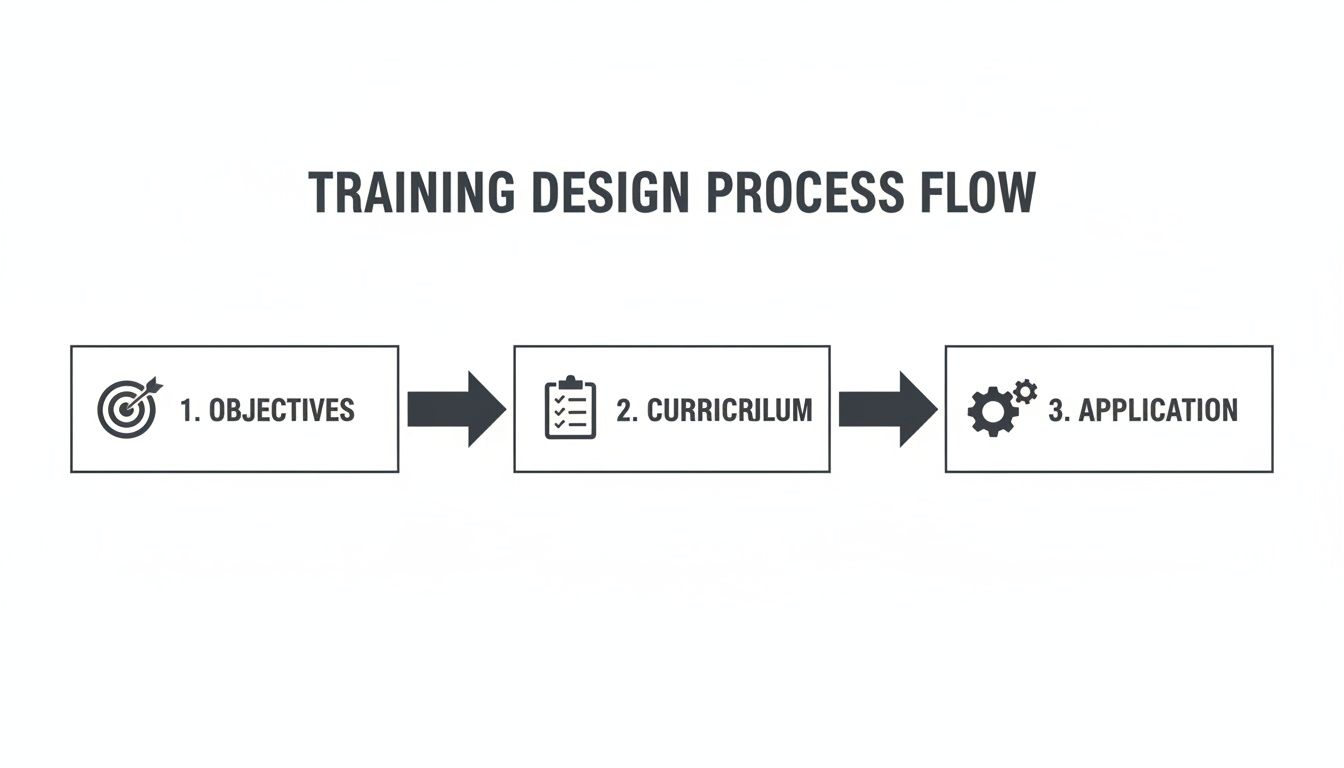
A successful program is built on specific objectives. Those objectives directly shape the content and activities you'll use.
Define Your Learning Objectives
Before you build a slide deck, define what success looks like. Your learning objectives are the bedrock of the entire training, and they need to be action-oriented and measurable.
Ditch passive goals like "understand prioritisation." Aim for active ones like, "Participants will block two hours of uninterrupted focus time on their calendar every day."
Good objectives sound like this:
- Participants will identify their top three personal time-wasting habits using their own work data.
- Team members will apply the "two-minute rule" to reduce their email inbox clutter by 50%.
- Each employee will create a personal action plan for communicating their availability and focus time to their team.
A well-designed training program doesn't just present information; it changes behavior. The goal is to equip people with practical skills they can apply the moment they get back to their desks.
Success hinges on participants' ability to learn how to build healthy habits that actually stick, turning these new strategies into automatic behaviors.
Build a Relevant Curriculum
With clear objectives set, you can build your curriculum. Each module should directly support one or more of your goals.
In the Netherlands, the corporate education market is valued at USD 2.5 billion, and time management is a top priority. A recent survey showed that 85% of IT HR managers include modules specifically designed to reduce context switching and improve focus. This aligns with WhatPulse's ability to track application usage and keyboard activity. These trainings have shown a 25% improvement in benchmarked focus time baselines, helping companies spot bottlenecks in tool adoption and process changes.
Your curriculum should be a mix of concepts, hands-on activities, and group discussions.
If you have a module on digital distractions, you could start with a brief explanation of "attention residue." Then, jump into an activity where everyone audits and disables non-essential notifications on their devices, right there in the room. This focus on immediate, practical application makes the training memorable and effective.
Here is a breakdown of core modules you could include in your curriculum.
Core Modules for Your Time Management Curriculum
This table outlines essential modules, their objectives, and key activities for a comprehensive time management training program.
| Module Title | Primary Learning Objective | Key Activity Example |
|---|---|---|
| Taming the Digital Chaos | Participants will reduce digital interruptions by 40% | Live audit and disabling of non-essential app/email notifications. |
| The Art of Deep Work | Participants will schedule and protect at least one 90-minute focus block per day | Calendar blocking workshop where participants identify and schedule their deep work sessions for the upcoming week. |
| Mastering Prioritisation | Participants will correctly identify and prioritise high-impact tasks using a chosen framework (e.g., Eisenhower Matrix) | Group exercise using real, anonymised project tasks from the company to practice prioritisation. |
| Energy Management, Not Time Management | Participants will identify their peak energy times and align them with their most important tasks | Personal energy mapping exercise where individuals track their focus and energy levels over a typical day. |
| Effective Communication & Boundaries | Team members will create clear protocols for communicating availability and managing expectations | Role-playing scenarios on how to say "no" to low-priority requests and communicate focus time to colleagues. |
Using a structure like this ensures every part of your training is directly tied to a tangible, real-world outcome.
For more ideas on making these activities engaging, check our guide on how to gamify your employee productivity.
Set a Quantitative Baseline Before You Start Training
How do you prove your time management training worked? You can't rely on guesswork or feelings. You need hard data. This means establishing a quantitative baseline—a clear, data-backed picture of your team's work habits before a single training module is delivered.
This isn't about watching over anyone's shoulder. It's about drawing a starting line so you can measure the distance your team travels after the training. We’re looking for aggregated data on work patterns: which applications get the most use, how much focused time people get, and how often they're switching tasks. Using a privacy-first platform is non-negotiable here; it's the only way to build the trust needed for genuine buy-in.

A dashboard showing team-level metrics like these gives you the insights to spot trends without ever singling out an individual.
The Right Tools and the Right Metrics
To get this data, you need a tool built with employee privacy at its core. WhatPulse Professional is designed for exactly this. It tracks which applications are used and for how long, but it never records screen content, the order of keystrokes, or what someone is doing inside an application. This is a key distinction for maintaining trust.
Once you have the right tool, decide which Key Performance Indicators (KPIs) to track. Don't measure everything. Focus on a few metrics that tie directly back to the goals of your time management training.
Here's a solid starting set of KPIs:
- Application Usage: What percentage of the day is spent in core work apps versus communication tools or other potential distractions?
- Focus Time: How much uninterrupted time do people spend in a single, productive application? This is a great indicator of deep work.
- Context Switching: How many times per hour does an employee switch between different applications? A high number often signals a reactive, unfocused workflow.
For example, you might discover your software team spends 35% of their day bouncing between their coding environment, a chat client, and email. Now you have a concrete, measurable problem your training can solve.
How to Talk About It With Your Team
The way you introduce this process will make or break it. Be transparent from day one.
Frame it as a team-wide effort to understand and improve how work gets done. Emphasize that all the data is aggregated and anonymised. The goal is to spot patterns like, "we spend too much time in meetings" or "our project management tool isn't being used to its full potential," not to monitor individuals.
The real objective is to give employees data they can use for their own benefit. When people see for themselves how their time is actually spent, they’re far more motivated to change their habits.
Dutch adults show high engagement in training (56.1% participation), but time management remains a challenge. Data shows employees who spend over 30% of their day in unproductive apps benefit most from this kind of structured training. Tools like WhatPulse let teams track project time before and after training, often revealing gains of 22% in productive hours.
Building Your Pre-Training Dashboard
With your tool ready and your team on board, it’s time to build a simple dashboard. Think of it as your single source of truth for the pre-training period.
Your dashboard should clearly display the KPIs you've chosen. Use simple charts and graphs to show things like:
- A pie chart of application usage, broken down into 'Productive', 'Communication', and 'Distraction'.
- A bar chart showing the average number of context switches per hour for different teams.
- A line graph tracking the average daily focus time over a two-week baseline period.
This dashboard does more than give you a starting point. It’s the evidence you need to justify the investment in training. When leadership sees a clear visualization of the challenges, they are much more likely to support the initiative. It turns an abstract problem like "we need better time management" into a data-backed business case. You can learn more about how to set up baseline metrics for continuous improvement in our dedicated guide.
Running Engaging and Actionable Training Sessions
A time management training session that actually works isn't a lecture; it’s a workshop. The point is to get people practising new behaviors right away, not just nodding along to a slideshow. The best sessions I've run move from concept to hands-on application in minutes, creating an active learning space where people feel involved and leave with a real plan.
This shifts your role as a facilitator. Think of yourself less as a teacher and more as a coach. You’re there to guide activities, spark discussions, and help individuals connect the training material to their own work habits.
Kick Off with Data: The Distraction Audit
Start by making it personal. Before the workshop, have each participant review their individual WhatPulse dashboards. Then, kick off the training with what I call a "Distraction Audit." This isn't about judgement—it’s about discovery.
Give everyone five quiet minutes and a simple worksheet to answer these questions based on their own data:
- What application used the most time outside of my core work tools?
- During which part of the day did my context switching (app-hopping) peak?
- What was the single biggest surprise I found in my data?
This exercise immediately grounds the session in reality. Instead of talking about abstract "distractions," each person is looking at their own actual time sinks. This creates instant buy-in because the problem is no longer theoretical—it’s right there in their own data.
From Audit to Action: Calendar Blocking Workshop
Once everyone has identified their personal productivity drains, the next move is to give them a tool they can use on the spot. I’ve found that a group activity on calendar blocking is the perfect follow-up.
Walk the group through a simple, three-step process:
- Find the High-Impact Tasks: Ask everyone to look at their project list for the upcoming week and pick one or two tasks that require deep, uninterrupted focus.
- Block the Time: Have them open their actual work calendars and schedule a 90-minute "focus block" for each of those tasks. They should give it a clear title, like "Deep Work: Finalise Q3 Report."
- Set the Boundaries: Talk about how to protect this time. This includes setting their status to "Do Not Disturb" in chat apps and maybe turning off email notifications during the block.
In just 15 minutes, every participant has a tangible plan to build deep work into their week. They've gone from spotting a problem to scheduling a solution.
The most effective training provides tools, not just rules. Giving someone a framework is good; guiding them as they use it to solve their own problem is better.
Facilitating for Both In-Person and Virtual Sessions
Engagement tactics have to fit the environment. What works in a physical room can fall flat on a video call.
For In-Person Sessions:
- Use physical props: Sticky notes, flip charts, and colored dots for voting make brainstorming and prioritising feel more dynamic.
- Encourage movement: Break up long stretches of sitting with "walk and talk" pairs, where two people discuss a topic while walking around the room.
- Read the room: Watch the body language. If you see people losing focus, it’s your cue to switch to a more interactive activity.
For Virtual Sessions:
- Leverage breakout rooms: Use them often for small group discussions. This stops a few dominant voices from taking over the conversation. A group of 3-4 is ideal.
- Use digital whiteboards: Tools like Miro or Mural are fantastic for collaborative brainstorming and group calendar blocking exercises.
- Conduct frequent polls: Simple, quick polls can gauge understanding, gather opinions, or just re-engage a quiet audience.
Handling Common Objections and Hybrid Work Challenges
You’re going to get pushback. Be ready for it.
A common one is, "My boss expects me to be available all the time." Don't dismiss this. Acknowledge the pressure and turn it into a group problem-solving exercise. Ask, "How can we, as a team, communicate our focus time in a way that manages expectations without causing delays?" This often leads to practical solutions like shared focus calendars or agreeing on "no-meeting" afternoons.
For hybrid teams, tackle the unique friction points head-on. Discuss strategies for managing the "fear of missing out" (FOMO) that can lead to constant channel checking. Guide a conversation on setting clear communication norms—for instance, agreeing that urgent requests are calls, while everything else can wait for a reply in the chat. The goal is to help them build a playbook that works whether they're in the office or at home.
Finally, make sure every participant leaves with a personal action plan. It can be a simple document where they write down the one or two habits they will start implementing tomorrow. This simple step turns the day's learning into a real commitment.
How to Measure Impact and Calculate ROI
The training sessions are over, but the job isn't finished. Now comes the question that leadership really cares about: did it work? This is where you connect new habits to real business results, moving beyond feel-good feedback to build a clear, data-backed story of success.
Your analysis begins by pulling up those baseline metrics you gathered before the training. The real magic happens when you compare that starting point with new data collected in the weeks and months that follow. This comparison is your objective proof of change.

Building a Post-Training KPI Dashboard
Think of your pre-training dashboard as the starting line. Now, you need to build a new one showing how far your team has come. Using a tool like WhatPulse Professional, you can create a simple, visual story that leaders can grasp in a single glance.
Keep this dashboard focused. It should directly compare pre- and post-training data for the KPIs you chose earlier.
- Focus Time: Has the average uninterrupted block of time in productive applications gone up? An upward trend is a fantastic sign of better deep work habits.
- Context Switching: Are people jumping between apps less frequently? This shows they’re getting better at batching tasks and managing interruptions.
- Application Usage: Do you see a clear shift away from distracting apps and more time spent in core work tools? This points to improved digital discipline.
For example, your dashboard could reveal that average daily focus time shot up from 1.5 hours to 2.5 hours per employee, while context switching dropped by a solid 30%. These are the kinds of hard numbers that get attention.
From Productivity Metrics to Business Outcomes
Productivity data is great, but the conversation becomes powerful when you tie it to business outcomes. This is how you calculate a genuine return on investment (ROI). It means looking beyond the raw numbers and seeing how they connect to what’s happening on the ground.
Consider the Dutch government's BZ ministry, which saw a spike in demand for this type of training. In the business world, we see similar data-driven results. It's not uncommon for employees to lose 28% of their day to context switching before training. After a few targeted workshops, that number can drop by as much as 35%. You can learn more about how the Dutch government thinks about HR and training in this annual report.
Your final report should tell a simple story: We invested in training, which changed specific work habits, and those changes led to measurable improvements in how we operate.
This kind of data, gathered with GDPR-compliant tools, gives finance and operations a clear line of sight. They can see the impact in metrics like a 20% improvement in software licence utilisation as teams start consolidating their work into approved applications.
A simple before-and-after table makes this impact incredibly clear for stakeholders.
Pre-Training vs Post-Training KPI Comparison
| Metric (KPI) | Pre-Training Baseline (Avg.) | Post-Training Result (Avg.) | % Improvement |
|---|---|---|---|
| Daily Focus Time | 1.5 hours | 2.5 hours | +67% |
| Context Switches per Hour | 18 | 12 | -33% |
| Project Ticket Completion Time | 4.2 days | 3.5 days | -17% |
| Unused Software Licences | 85 | 55 | -35% |
This kind of snapshot instantly demonstrates the value delivered, translating abstract concepts like "focus" into tangible operational gains.
Calculating the ROI
To give leadership the full picture, you need to put a price on these improvements.
One of the cleanest ways to do this is through software licence optimisation. Dig into your WhatPulse application usage data to find underused or redundant software. If your training successfully nudged employees to standardise on one project management tool, you can calculate the direct cost savings from cancelling the licences for the two other tools they’ve abandoned. That’s a clear, hard-dollar ROI.
Another angle is to link productivity gains with project velocity. Chat with your project managers. Does the drop in context switching and the rise in focus time line up with faster ticket completion or fewer missed deadlines? It might not be a direct dollar-for-dollar calculation, but showing that a 20% increase in focus corresponds with a 15% faster project delivery cycle is a compelling argument.
For a closer look at connecting these dots, check out our guide on tracking time spent on projects.
Ensuring Privacy, Trust, and Long-Term Adoption
When you introduce any tool that measures how people work, their first reaction is often suspicion. Without trust, this entire initiative is dead on arrival. People will naturally worry that this is about surveillance, not support, and you can't blame them.
This is where your communication strategy becomes everything. You have to be direct, transparent, and consistent from the start. The core message needs to be clear: we are looking at team-level work patterns to make our processes better, not to watch over anyone's shoulder.
This is why we recommend a privacy-first platform like WhatPulse. Its entire design backs up your message. WhatPulse never captures what’s on the screen or the specific order of keystrokes. All it tracks is which applications are used and for how long. That’s it. This technical safeguard is your best proof that the goal is about improving work, not monitoring people.
Communicating Ethically and Effectively
When you roll this out as part of your time management training, you need to get ahead of the conversation. Don't wait for the rumor mill to start. Address the concerns before they take root.
Set up an open meeting to walk everyone through the "what" and the "why."
- What are we measuring? Be transparent. Show them a sample dashboard. Point out that it only displays aggregated, anonymised data like application usage categories and how often the team is context switching.
- What are we NOT measuring? State it plainly. Make it clear that keystroke logging, screen recording, and monitoring the content of their work is impossible with this tool.
- Why are we doing this? Link it directly back to the training. Explain that this data gives us a baseline, a starting point. It helps us see if the new time management techniques are helping the team cut down on distractions and carve out more focus time.
Having a clear understanding of data privacy policies is a huge part of building trust. Being upfront with this information creates the psychological safety people need to engage with the training and the data without feeling threatened.
Making the Training Stick
The initial training session is just the beginning. Lasting change only happens when new behaviors are practiced until they become habits. If you treat this as a one-off event, old patterns will creep back within a few months.
To make this stick, you need to build a system of continuous improvement. The data you’re collecting isn't just for a final ROI report to show management. It's a living tool for ongoing coaching and refinement.
The goal is to foster a culture where employees feel empowered by data, not scrutinised by it. The data should spark conversations about obstacles and solutions, never criticism.
For example, if the data shows context switching skyrockets on Friday afternoons, that’s not a moment for criticism. It’s an opportunity to open a discussion. "Hey team, what's happening on Fridays? Are we getting slammed with last-minute requests that kill our focus? How could we structure our week differently to protect that time?"
Strategies for Sustained Change
To keep the momentum going long after the training day, weave these practices into your team's regular rhythm.
- Regular Check-ins: Carve out 15 minutes in a monthly team meeting to look at the anonymised WhatPulse dashboard together. Talk about the trends you see as a group and, most importantly, celebrate the improvements.
- Peer Support Groups: Encourage small, voluntary groups of 3-4 people to form. They can check in with each other on their time management goals, creating accountability without it coming from the top down.
- Coaching with Data: Managers should use the aggregate data in their one-on-one meetings not as an evaluation tool, but as a coaching tool. Instead of "Your numbers are down," it becomes, "I've noticed our team's overall focus time has dipped. What roadblocks are you hitting that I can help clear?"
This approach changes the data from a static report card into a dynamic tool for growth, ensuring the benefits of your training last.
Common Questions About Data-Driven Training
Whenever you introduce a new program that involves data, questions are going to come up. It's only natural. The best way to get everyone on board is to tackle those concerns head-on, making sure the team understands this is about insight, not oversight.
Think of it less like surveillance and more like giving your team a map and a compass. You’re simply showing them where they are now so they can find a more focused, less chaotic way of working.
How Do You Convince Employees This Isn't Surveillance?
This one is all about transparency. From the first conversation, you have to frame this as a tool for team improvement and personal insight, never individual monitoring.
Be clear about what’s being measured—things like application usage and general activity levels—and, just as importantly, what isn’t. You need to reassure your team that you’re not looking at screen content, reading chat messages, or logging keystrokes. This is where using a privacy-first platform like WhatPulse Professional is a huge help, as its entire design makes that kind of intrusive monitoring impossible.
The most convincing argument is simply sharing the data. When employees see the same anonymised, aggregated insights that leadership does, the whole process is demystified. They see it's about patterns, not people.
When you do that, the tool stops feeling like a potential threat and becomes what it's meant to be: a resource for everyone to get better.
What Are the Most Important Metrics to Track?
You can track a million things, but you shouldn't. Drowning your team in vanity metrics will dilute the message. The key is to focus on a few metrics that directly tie back to the goals of your training on time management.
Here are the three KPIs that tell a story:
- Focus Time: This is the gold standard. It measures the uninterrupted time people spend in productive applications. Seeing this number go up is a direct signal that deep work habits are sticking.
- Context Switching Frequency: This metric tracks how often people jump between different apps. It’s a powerful indicator of distraction. A steady decrease shows your team is getting better at batching tasks and managing interruptions.
- Application Usage Distribution: You're looking for a shift here. Is the time spent in core work apps increasing, while time in communication tools or other distractors is shrinking? This gives you objective proof of better digital discipline.
Together, these metrics paint a clear picture of behavioral change, moving success from a subjective feeling to something you can point to.
How Long Until We See Results?
You'll probably see some initial changes quickly. Within the first two to four weeks, people will start experimenting with things like calendar blocking or turning off notifications. They're usually keen to apply what they’ve just learned.
But for those small actions to become solid, lasting habits that show up in the data, you need to give it more time. Plan on measuring for at least a full quarter (90 days). The data might be a bit noisy at first, but you'll typically see a stable, upward trend in focus time after the 60-day mark. Real change needs patience and consistent reinforcement to stop people from sliding back into old patterns.
Can This Training Approach Work for Remote Teams?
Absolutely. In fact, a data-driven approach is almost purpose-built for remote and hybrid teams. When you don't share a physical office, you lose that natural visibility into work patterns. Data gives you an objective way to see what's happening.
It helps you spot challenges that are unique to remote work, like "digital presenteeism"—where someone is online but clearly not engaged—or a lack of focus because of a chaotic home setup. The training modules are easy to deliver virtually, and a tool like WhatPulse gives you a consistent yardstick for measuring focus and productivity, no matter where your team is working from. It shifts the entire conversation from physical presence to tangible outcomes.
Ready to move beyond generic seminars and prove the ROI of your training? WhatPulse provides the privacy-first data you need to establish baselines, measure impact, and empower your team with insights, not surveillance. Learn how our platform can support your next training on time management.
Start a free trial