
WhatPulse Professional 6.0.2 introduces Web Insights, expanded portal visibility, and a series of improvements aimed at managed and enterprise environments.
This massive release focuses on one big theme: bringing website activity into the same analytical model as applications, while continuing to harden deployment and stability across Windows and macOS.
Web Insights: website activity tracking
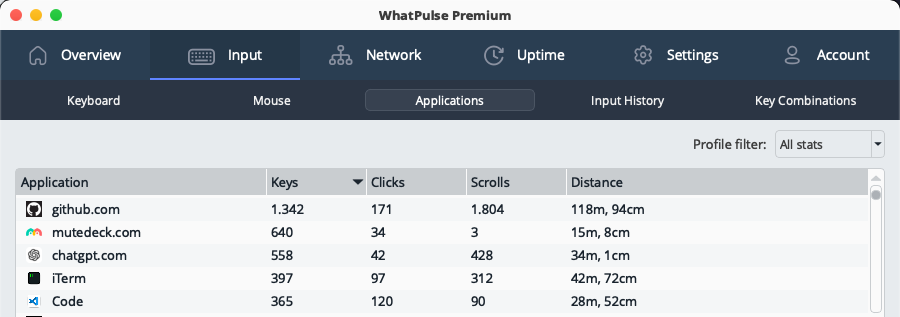
Web Insights extends WhatPulse beyond applications to include website-level activity tracking through browser extensions.
Browsing activity is now integrated directly into the WhatPulse client, making websites a first-class data source alongside desktop applications.
With Web Insights enabled, you can:
- Track time spent and activity on websites, including keys, clicks, scrolling, and mouse movement
- View website activity alongside applications inside the WhatPulse app
- Associate website stats with profiles to separate work, personal, or other contexts
- Exclude specific websites or patterns from tracking
- Export website activity data for reporting or deeper analysis
Privacy-first by design
Web Insights follows the same privacy principles as the rest of WhatPulse Professional:
- Only website domains are tracked, never full URLs or page content
- Browser extensions do not run in private or incognito mode
- Website data remains private within your organization
For managed environments, browser extension pairing can be auto-approved via settings-overrides.ini when extensions are pre-installed. This makes Web Insights suitable for structured enterprise rollouts. Learn more about deploying the extension here
Web Insights in the Portal: organization-wide website visibility
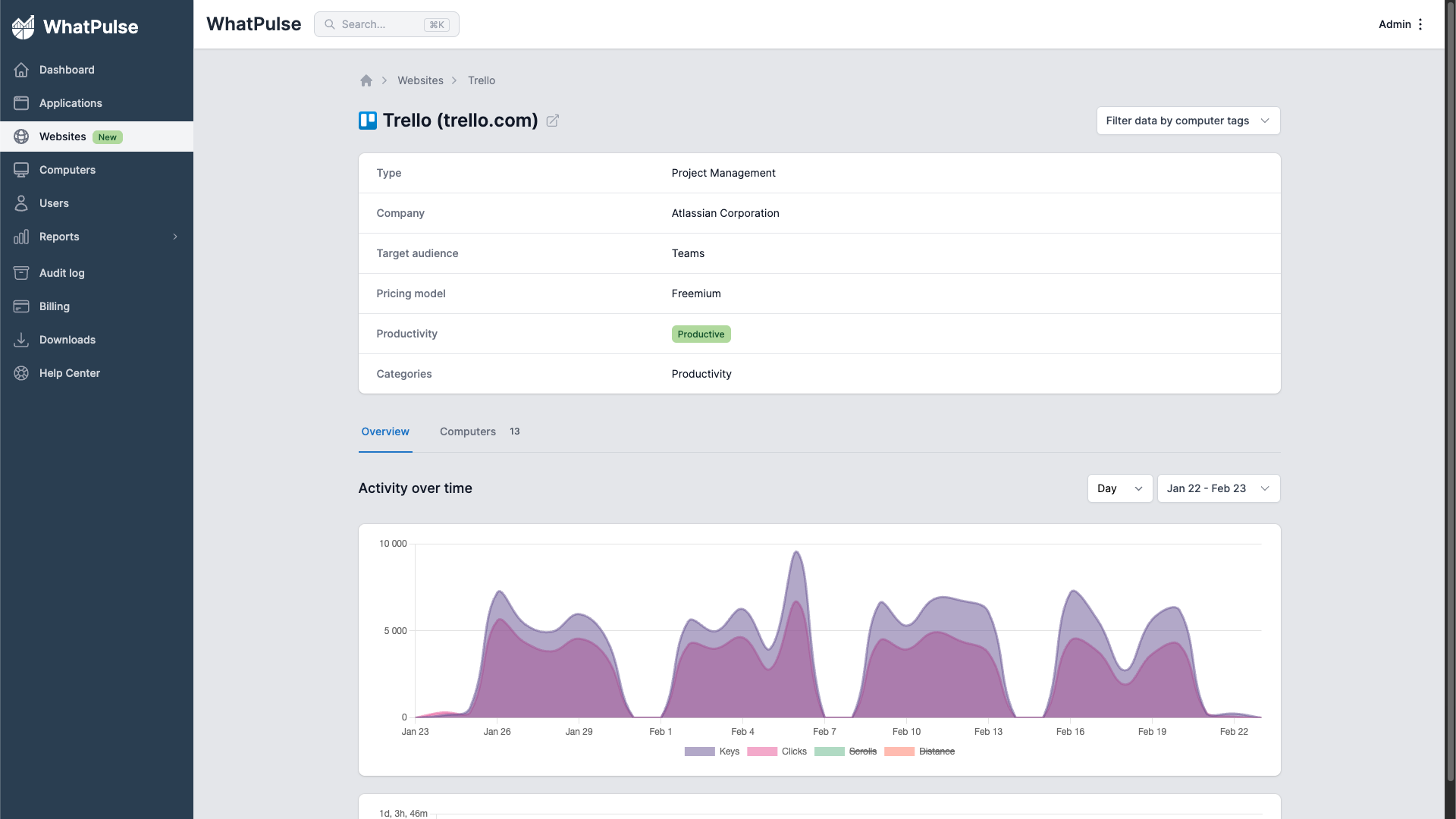
Web Insights data is now available directly inside the WhatPulse Professional portal. Administrators can view aggregated website usage across the organization, including:
- Total time and activity per domain
- Keys, clicks, and engagement metrics
- Website metadata such as tags, categories, and productive/non-productive classification
- Usage trends over time
From the organization overview, you can drill down into individual users and profiles to see website usage at a granular level, fully integrated with application activity dashboards.
This makes it possible to move from "Which websites are used company-wide?" to "How is this specific domain used by a specific team or user?" in just a few clicks.
Managed deployment improvements
6.0.2 continues to improve reliability in managed Windows environments.
Standardized Windows startup
Task Scheduler has been removed entirely. Startup is now handled via:
- HKCU (single-user installs)
- HKLM (all-users / installer-managed environments)
The client automatically migrates legacy Task Scheduler entries and lowercase registry keys on first run after upgrade.
The installer now sets a startup_managed_by_installer flag in settings-overrides.ini, allowing administrators to fully control startup behavior without interference from the client.
MSI fixes
Several installer issues have been resolved:
- Proper 64-bit MSI installation (no more WOW6432Node writes)
- Fixed HKLM startup registry entry creation
- Fixed all-users install checkbox behavior
Additional improvements include:
- OS username included in client authorization requests (portal integration coming)
- Computer serial number included in asset upload data (portal integration coming)
These changes improve predictability in enterprise rollouts.
UI and usability improvements
- Main window is now fully resizable and remembers its position
- Application Activity charts support forward and backward day navigation
- Dialogs and confirmations refined across the app
- New application sync status window with detailed logging
- Time series handling separated from pulsing to prevent dashboard interruptions during sync delays
These refinements make the client feel more flexible and robust during daily use.
Stability and performance
This release also focuses heavily on background stability:
- Heatmaps now render in the background to avoid UI freezes
- Improved detection of hardware, input devices, and network interfaces
- Better handling of unusual display and multi-monitor setups
- Hardened cleanup across network monitor, browser extension server, database, and heatmap components
macOS
- Safer GeoIP database updates
- Fixed timezone-related timestamp crash
- Standalone
.pkginstaller for MDM and enterprise deployment
Windows
- Third-party shell extensions (e.g. OneDrive, Dropbox) no longer crash icon retrieval
- Improved MSI uninstall cleanup with proper process shutdown
Client API
For teams integrating WhatPulse into internal tooling:
- New
/v1/idleendpoint exposing internal last-input timestamp - Idle status added to
/v1/all-statsand websocket updates
This improves accuracy for idle detection in external dashboards and automation.
Summary
WhatPulse Professional 6.0.2 brings:
- Website-level activity tracking
- Organization-wide website visibility in the portal
- Cleaner enterprise deployment on Windows
- Improved stability across platforms
Web Insights closes the gap between application tracking and browser-based work, making it easier to understand how time is actually spent across your organization.