
Process management turns a jumble of tasks into a predictable, measurable operation. It's a structured approach to get a handle on your systems and workflows. Think of it as creating a repeatable recipe for a complex task, ensuring you get the same quality result every time.
Defining The Process Management Process

Process management is a formal discipline for making work predictable. It’s how you move an activity from an art form into a systematic operation. This isn't about adding bureaucracy or rules that stifle creativity; it's about establishing a clear path so work can flow smoothly.
Take software deployment. Without a defined process, it’s often a mad scramble of reactive firefighting. Steps get missed, outcomes are all over the place, and engineers burn time figuring out what to do next.
With a process, it becomes a documented, logical sequence: code commit, automated testing, staging deployment, and final user acceptance. Each stage has a clear owner and a specific, expected outcome.
Core Goals and Outcomes
The goal is to build a framework that lets teams scale operations without quality taking a hit. This means spending less time reinventing the wheel on every project and more time executing tasks correctly.
A solid process management approach delivers several business outcomes:
- Reduced Errors: By standardising steps, you minimise the chances of human error and inconsistent results.
- Improved Scalability: New team members can get up to speed much faster because the "how-to" is already documented.
- Greater Predictability: You can more accurately forecast project timelines and figure out resource needs when the steps are known.
- Enhanced Efficiency: Bottlenecks become obvious and can be dealt with, leading to faster cycle times.
A well-defined process provides clarity. It answers who does what, when, and how, removing ambiguity and letting teams focus on the work itself.
This systematic approach lays the groundwork for more complex needs. For example, business continuity planning steps replace a chaotic crisis response with a structured, repeatable plan. It's also part of developing a good Standard Operating Procedure (SOP). You can learn more about creating an effective standard operating procedure in our guide.
Understanding The Five Stages Of The Process Lifecycle
Process management isn't a "set it and forget it" task. It’s a living cycle. Your workflows need constant attention to stay healthy. This cycle is typically broken into five stages that flow into one another: Design, Model, Execute, Monitor, and Optimise.
To make this practical, let’s follow a common process for an engineering team: onboarding a new software developer. This workflow can be either smooth or chaotic. The five-stage approach makes the difference.
The Process Management Lifecycle Stages
This table summarizes the five stages, their goals, and the activities involved.
| Stage | Primary Goal | Key Activities |
|---|---|---|
| 1. Design | Create a clear blueprint of the ideal workflow. | Mapping steps, identifying stakeholders, defining inputs and outputs, creating checklists. |
| 2. Model | Stress-test the design to find weaknesses before it goes live. | Running "what-if" scenarios, simulating the process, identifying potential bottlenecks. |
| 3. Execute | Put the designed and modelled process into action. | Following documented steps, using defined tools, performing the actual work. |
| 4. Monitor | Collect objective data to measure how the process performs. | Tracking key metrics, gathering feedback, comparing actual performance against goals. |
| 5. Optimise | Use data from monitoring to make targeted improvements. | Analysing performance data, identifying root causes of issues, updating the process design. |
Now, let's explore what each stage looks like using our new developer onboarding example.
1. Design The Workflow
The design stage is blueprinting. You're not doing anything yet—you're mapping out the sequence of events from the moment the offer is signed to the developer’s first code commit.
For our new developer, this means answering basic questions and writing them down. What happens on day one? What laptop do they need? Who gives them access to code repos, Slack, and project boards? The goal is a detailed map of the onboarding journey.
This map might start as a simple checklist or flowchart:
- Pre-Day One: HR sends paperwork; IT sets up the laptop and core accounts.
- Day One: The manager holds a welcome meeting; the developer sets up their system; they meet the team.
- Week One: They start paired programming sessions; they're assigned a small bug fix; they review the team's coding standards.
2. Model The Scenarios
Once you have a design, you model it. You run "what-if" scenarios to find weak spots before a real person suffers through them. Think of it as a dress rehearsal.
You might walk through the new developer's first day. Does IT know this developer needs admin rights on their machine? Does the security team's standard 24-hour turnaround for database access create a bottleneck, leaving the new hire staring at their screen on day two? Modelling finds these friction points.
The purpose of modelling is to expose hidden dependencies and flawed assumptions. You might assume getting a GitHub license is instant, but the finance department's approval process takes 48 hours. This stage uncovers that reality before it frustrates your new hire.
By walking through the process hypothetically, you can tweak the design. For instance, you might change the workflow so IT requests all necessary access credentials a week before the start date, sidestepping the day-one bottleneck.
3. Execute The Process
Execution is the live run. The new developer is starting, and they are going through the onboarding process you designed. The plan is put into action.
The manager follows the checklist. The assigned mentor kicks off the first paired programming session. The developer gets their first task. The main focus during execution is sticking to the documented plan.
4. Monitor The Performance
A process without monitoring is guesswork. In this stage, you gather data to see if the process is hitting its goals. You need objective metrics, not vague feelings.
For developer onboarding, you could track:
- Time to First Commit: How many days did it take for the new hire to get their first piece of code into the main repository?
- Setup Ticket Resolution Time: How long did it take for IT to close all initial setup and access tickets?
- Mentor Check-in Frequency: Did the planned daily check-ins happen every day?
Monitoring shows the gap between your designed process and what really happens. This isn't about blaming people; it's about getting an honest look at the system's performance. It's also important to track the right metrics, which is why understanding the difference between things like cycle time vs. lead time is necessary.
5. Optimise For The Next Cycle
In the final stage, optimisation, you use data from monitoring to make the process better. This step turns process management into a true lifecycle and drives continuous improvement.
Let's say your monitoring showed the average "time to first commit" was five days, but your goal was two. You dig into the data and discover the delay was caused by confusion around setting up the local development environment.
With that insight, you can optimise the process. Maybe you update the documentation with clearer instructions, or create a pre-configured virtual machine to simplify the whole thing. The improved process is now the new baseline, ready for the next hire. The cycle begins again.
Defining Key Roles In Process Management
A process without a clear owner is a process that will likely fail. Process management isn't just drawing flowcharts; it's assigning specific roles where people are accountable for outcomes, not just for ticking off tasks.
When a workflow grinds to a halt, the first question should be "who owns this?" not "what broke?" This shift in thinking prevents diffusion of responsibility, where everyone assumes someone else is in charge. Accountability drives a sustainable process.
These roles operate within a continuous, five-stage lifecycle.
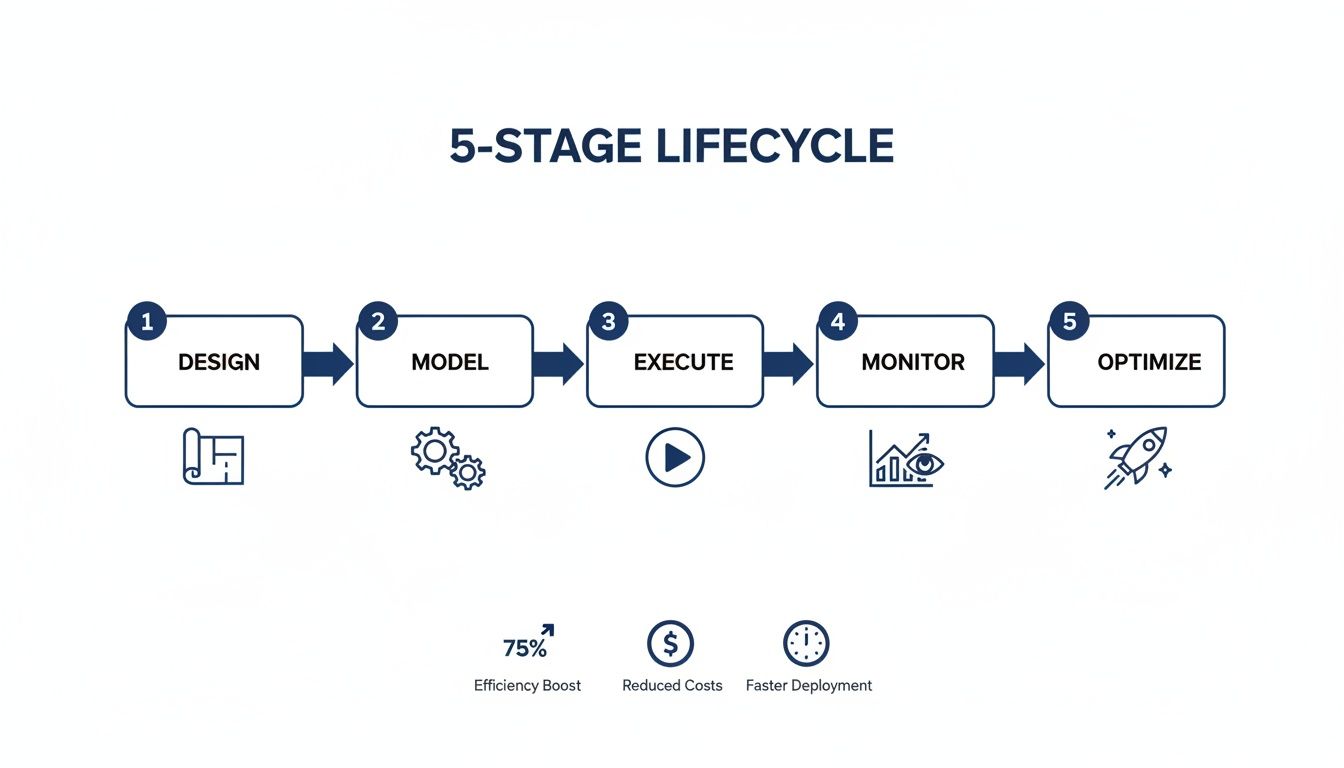
This is a constant loop of designing, modelling, executing, monitoring, and optimising that keeps the process improving.
The Key Players
For any process, you need to assign people to three primary roles. In smaller teams, one person might wear multiple hats, but the responsibilities themselves must be separate and understood by everyone.
The Process Owner: This person has the final say and ultimate responsibility for how the process performs. They aren't in the weeds managing daily tasks, but they are accountable for making sure the process hits its business goals. If the software deployment process is consistently late, the Process Owner has to answer for it and lead the effort to fix it.
The Process Analyst: Think of this person as the data detective. The analyst's job is to monitor the process, dig into performance metrics, and pinpoint the evidence-backed bottlenecks. They give the Process Owner the objective data needed to make smart decisions. For example, an analyst might discover that 75% of all delays in a bug-fix process happen at the code review stage.
Team Members: These are the experts on the ground—the people doing the day-to-day work. Their role is important because they provide direct, hands-on feedback about what's working and what's not. They're the first to spot friction, redundant steps, or confusing instructions.
A common mistake is to hand ownership to a manager too far removed from the actual workflow. The best Process Owner is often a senior team member with a deep, practical understanding of how things work and the authority to make changes stick.
When you assign these roles, you create a clear structure for improvement. Team members execute the process and flag problems. The analyst investigates those problems with data. The owner uses that data to make strategic decisions, ensuring the process is followed, maintained, and always getting better.
How To Map And Measure Your First IT Process

This is where theory gets real. It’s tempting to overhaul your entire software development lifecycle in one go, but that often fails. Start small. Pick a workflow that's manageable enough to tackle but big enough to make a noticeable difference.
Look for friction points. Where do your teams complain the most? It might be the bug reporting and triage workflow, the process for provisioning new software licences, or the back-and-forth needed to approve new hardware.
These are perfect starting points. They happen often enough to give you good data, but they aren’t so sprawling that mapping them becomes a project. The goal is a quick win that proves process management actually works.
Step 1: Start With A Simple Map
Before you can fix anything, you have to see it clearly. Exploring a few business process mapping techniques is a good first step, but don't get bogged down finding the perfect tool. You don't need fancy software—a whiteboard and sticky notes work fine.
Get the people who do the work in a room. Ask them to walk you through the process, step by step, as it happens today. Forget the ideal version; you need to map the "as-is" reality. This map is your ground truth.
For a bug reporting process, it might look like this:
- A developer finds a bug on the staging server.
- They manually create a new ticket in the project management tool.
- They hunt down the right logs and screenshots to attach.
- The ticket gets assigned to the product manager for triage.
- The PM decides how bad it is and assigns it back to an engineering lead.
Doing this often illuminates obvious problems. You might discover two people are doing the same validation step, or that tickets sit in a queue, unassigned, for days.
Step 2: Establish A Factual Baseline
Your map shows you the path. Measurement tells you how long each part of that path takes. Without a baseline, you're guessing, and you'll never be able to prove that your changes made things better.
This is where you switch from feelings to facts. You need objective, hard data on how the process performs right now. Telemetry tools are useful here. A platform like WhatPulse Professional can gather real data on application usage and task duration without getting in your team's way.
The single biggest mistake in process improvement is relying on anecdotes. A developer might feel a task is slow, but data can pinpoint the real problem: it wasn't the task itself, but the 30 minutes spent switching between three different apps to complete it.
A solid baseline shifts the conversation from opinions to evidence. You can say with certainty how long it takes, on average, to get a new software licence approved or how many different apps an engineer has to touch to close out a single bug ticket. We dig into why this is so important in our guide on tracking vs measuring.
This kind of data makes it easy to see where your team's time is really going.

A visual dashboard like this instantly shows which tools are dominating a workflow, giving you clear hints about where you could consolidate or automate.
Step 3: Use Data To Find The Real Bottlenecks
Your baseline data will almost always surprise you. What you thought was the bottleneck is often just a symptom of a deeper issue. With hard numbers, you can find the one step in the workflow causing the biggest delays.
This shift isn't just happening in your team; it's an industry-wide move. The Business Process as a Service (BPaaS) market in the Netherlands, for example, is projected to hit US$1.91 billion by 2025. A reported 70% of Dutch organisations say using these services has made their teams more efficient. It shows a clear trend toward adopting tools that provide visibility into how work gets done.
Once you have your map and your measurements, you have what you need to start optimising. You’re no longer guessing where the problems are—you know exactly where to focus your energy to get the biggest impact.
Common Process Management Mistakes And How To Fix Them
Even a carefully planned process management strategy can fall flat. A workflow might look perfect on a whiteboard, but that means nothing if it isn't used. This usually happens because of a few predictable—and fixable—mistakes. The goal isn't just to document a process; it's to build something that helps people get work done.
One of the biggest traps is over-engineering a simple process. Teams get obsessed with creating the "perfect" workflow, complete with complex diagrams and a dozen approval gates for a task that ought to be simple. You end up with a process so clunky that everyone ignores it.
Another classic mistake is failing to secure team buy-in. When managers design a process in a vacuum without talking to the people who will use it every day, it’s doomed. The process lacks practical insights and feels like another top-down mandate, which encourages people to find workarounds.
Fixing Predictable Failures
The key to solving these issues is to stop treating process management like a one-off project. Think of it as a living system that needs constant feedback.
For over-engineering: Start with the most basic, stripped-down version of the workflow. Get that working first. Only add complexity when you run into a specific problem that a new step would solve. If a step doesn’t fix a real pain point, it probably doesn't belong there.
For poor adoption: Get the team involved from day one. Ask them where the friction is in their current workflow. They are the experts on how the work gets done, and their input during the design phase is the best predictor of whether the new process will stick.
A process is only as good as the problem it solves. If your team doesn't see how the new workflow makes their job easier, they will find ways to work around it. Engagement isn't a bonus; it's a requirement.
Recognising Internal vs External Solutions
A less obvious but equally damaging mistake is trying to manage every process internally. Some functions aren't your core strength, and trying to handle them in-house can drain resources. This is where outsourcing comes in.
The Netherlands' Business Process Outsourcing (BPO) sector is expected to hit US$7.90 billion in revenue by 2025 as more companies offload certain tasks to slash costs and improve efficiency. You can find more details about the Dutch BPO market's growth and its drivers. Failing to see when a process is a good candidate for outsourcing can tie up your best people on work that isn't central to what your business does. Making that strategic call is a part of effective process management.
Got Questions? We've Got Answers
You have the theory down, but putting process management into practice brings up questions. Let's tackle some common ones.
How Do I Choose The Right Tools For My Team?
The best tool is the one that solves your specific problem right now. Don't get distracted by a massive feature list.
If you're just trying to visualise a workflow, simple flowchart software or a whiteboard is a perfect place to start. For something more complex, like automating multi-step approvals, you'll probably need a dedicated Business Process Management (BPM) platform.
But what if your problem is figuring out why a process is slow or not being followed? That's where you need objective data. A telemetry tool like WhatPulse gives you a ground-level view of how your team actually uses their software, revealing hidden bottlenecks and time sinks caused by switching between apps. Start with your pain point, then find the tool that fixes it.
How Do I Measure The ROI Of A New Process?
You can't know if you've improved if you don't know where you started. To measure Return on Investment (ROI), you have to compare the 'before' and 'after' states.
First, establish your baseline. Before you change a single thing, measure the current process. This could be the average time to resolve a support ticket, how many steps are needed to provision a new software license, or the total cost per deployment.
Once the new process is live, track those same metrics. The difference is your return. If a new bug-triage process slashes the average resolution time from 72 hours to 24 hours, your ROI is the value of 48 hours of engineering time saved for every bug.
What Should I Do When A Process Is Not Being Followed?
First, assume the process is the problem, not the people. A workflow that gets ignored is usually a sign that it’s flawed.
Is it too complicated? Does it add pointless steps? Is it trying to solve a problem that the team doesn't actually have? Go talk to them. The people doing the work almost always have a good reason for finding a workaround. Use their feedback to simplify and refine the process until it becomes the easiest way to get the job done.
How Often Should We Review Existing Workflows?
The short answer: as often as necessary. The review cycle should match how quickly the process itself changes.
A stable process like your finance team's month-end closing might only need a review once a year. In contrast, a dynamic workflow like a software development sprint should be looked at constantly—maybe in every retrospective meeting.
Keep an eye on the technology landscape, too. The Business Process Management (BPM) market in the Netherlands is projected to hit USD 442.90 million by 2033, largely because new AI and data tools are changing what’s possible. You can read more about this BPM market growth to see how fast things are moving. If your metrics start to dip or a new tool offers a clearly better way of working, it's time for a review.
See how work really happens on your team. WhatPulse provides the objective data you need to map, measure, and optimise your most important processes without compromising employee privacy. Get started with WhatPulse Professional.
Start a free trial