

Mobile App Management (MAM) isn't about controlling your team's personal phones. It’s a focused way to protect company apps and data on devices you don't own. It creates a secure bubble around your business apps, keeping them separate from an employee's personal life.
The Foundation of Modern BYOD Security
Employees use their personal smartphones for work. This trend, "Bring Your Own Device" (BYOD), offers flexibility but creates a security headache. How do you keep company data safe on a phone running TikTok, personal email, and photo albums?
MAM solves this problem.
Instead of locking down the entire device, MAM targets only corporate applications. It treats business apps as a self-contained, secure workspace. This lets IT apply security policies directly to the apps that handle company information.
What MAM Controls
MAM offers granular control. It is not a clumsy, all-or-nothing tool. Administrators can set specific rules for how company data is handled.
Common controls include:
- Data Leakage Prevention: Block copying text from a managed app (like Outlook) and pasting it into an unmanaged one (like personal WhatsApp).
- App-Level Access: Require a separate PIN or fingerprint scan to open a corporate app.
- Secure Storage: Ensure any data saved by a managed app is automatically encrypted on the device.
- Selective Wipe: If an employee leaves, you can remotely delete only the company apps and their data. Their personal photos, contacts, and messages are left untouched.
This application-first model builds employee trust. People keep control and privacy over their device, while the company secures its digital assets. For any business managing personal devices, addressing app security concerns in a BYOD environment is the first step.
MAM works on a simple principle: manage the apps, not the device. This distinction respects employee privacy while giving IT the control it needs to protect corporate data.
Mobile app management lets your team use their own familiar devices. At the same time, it gives IT the tools to enforce security, maintain compliance, and prevent sensitive information from leaving on unmanaged hardware.
Understanding MAM vs MDM
Mobile App Management (MAM) and Mobile Device Management (MDM) are easy to confuse. They sound similar but operate on different principles. MDM controls the entire device. MAM secures only the corporate apps.
Think of MDM as a building landlord with a master key to every apartment. The landlord sets rules for the whole building and can clear everything out.
MAM is like a secure vault inside one apartment. It has no say over the apartment's front door or what the tenant does in their living room. Its only job is to protect what goes into and out of that specific vault.
What MDM Manages
Mobile Device Management (MDM) takes a top-down approach. It enrolls the entire device—company-owned or personal—and applies security policies at the hardware and operating system level.
With MDM, an IT admin can:
- Enforce a PIN or password for the whole device.
- Wipe the device to its factory settings.
- Restrict hardware like the camera or Bluetooth.
- Control Wi-Fi and VPN configurations.
- Push operating system updates.
This works for company-owned devices but feels invasive for personal phones. Most employees are not comfortable giving their employer the power to see everything on their phone or wipe their personal photos.
What MAM Manages
Mobile App Management (MAM) is a less intrusive solution for BYOD. Instead of managing the device, it focuses only on corporate applications, creating a boundary between personal and professional data.
The flowchart below shows this. MAM carves out a secure space for corporate apps, leaving personal data separate and private.
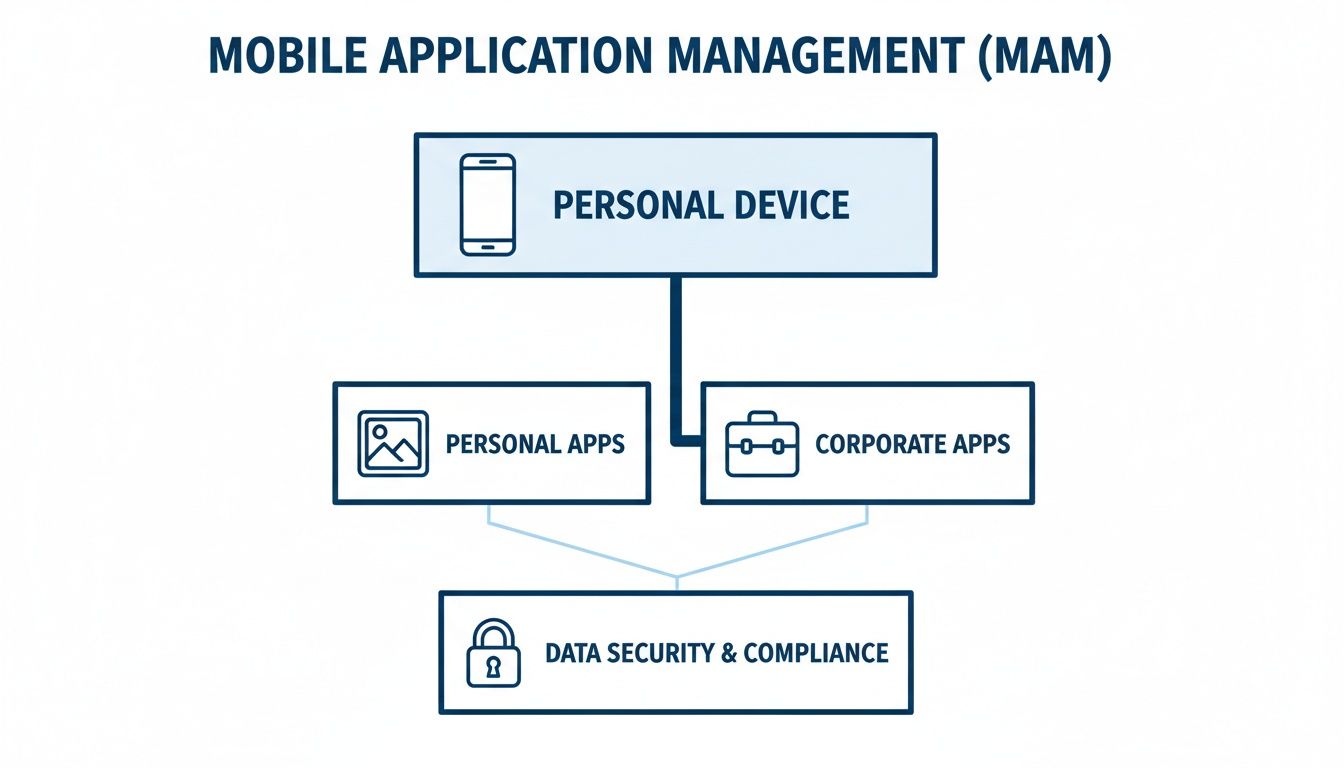
This separation is why MAM has become popular. It secures company assets without invading employee privacy.
The shift to BYOD is tied to modern work habits. In the Netherlands, 92 percent of people used their smartphones to get online in 2023. As mobile becomes the main work tool, IT strategies must shift from locking down devices to securing apps.
Here’s a direct comparison of their features.
| Feature | Mobile App Management (MAM) | Mobile Device Management (MDM) |
|---|---|---|
| Primary Focus | Securing corporate applications and data | Securing the entire mobile device |
| Control Scope | App-level policies (copy/paste, data sharing) | Device-level policies (passcodes, hardware) |
| Device Wipe | Selective Wipe: Removes only corporate data | Full Wipe: Resets device to factory settings |
| Ideal Use Case | BYOD (Bring Your Own Device) scenarios | Company-owned devices |
| Privacy Impact | Minimal impact on personal data and apps | High impact, potential access to all data |
| Device Enrolment | Not required; policies applied via apps | Required; device must be enrolled with IT |
The difference is scope. MDM is about control; MAM is about precision.
MDM controls the whole phone. MAM controls only the work apps on the phone. This distinction is why MAM is the preferred model for securing personal devices.
With MAM, an administrator can stop data from being copied out of a work app into a personal one. They can also perform a "selective wipe," which removes only corporate apps and their data, leaving personal content safe. This precision makes employees more willing to use their own devices for work.
Many of these functions can be managed through unified platforms. You can set up automated installs with Microsoft Intune for easier deployment. For businesses that have embraced flexible work, MAM offers a good balance between security and privacy.
How Does MAM Technology Actually Work?
Mobile App Management is a strategy implemented through a few distinct technologies. IT administrators use one of three main methods to apply security policies to company apps, each with trade-offs in speed, control, and complexity.
Choosing the right one depends on the apps you need to manage and your available resources.
App Wrapping for Quick Security
The fastest way to apply MAM policies is app wrapping. It is like putting a protective wrapper around a finished product. You take an existing app—like Salesforce or a PDF reader—and apply a security layer around it.
This process happens without touching the app's original code. The MAM solution adds a management layer that intercepts actions like saving files or copying text, ensuring they follow IT rules.
- Speed: It’s fast. You can secure an off-the-shelf app in minutes or hours.
- Compatibility: It works with a wide range of existing apps without developer involvement.
- Limitations: Control isn't as fine-tuned. You can only enforce policies supported by the wrapping tool.
App wrapping is a good choice for quickly securing business apps in a BYOD environment. It delivers a solid baseline of security without a major development project.
Containerisation to Isolate Corporate Data
For a more robust approach, there's containerisation. This method creates a secure, encrypted "container" or "work profile" on an employee's device. All corporate apps and their data must operate inside this isolated bubble.
Imagine a locked briefcase on your desk. Everything inside is protected, encrypted, and follows its own rules. The rest of the desk—representing personal apps, photos, and messages—remains separate.
Containerisation creates a distinct boundary between work and personal life on a single device. It allows IT to manage the "work" part without touching the "personal" part, which is essential for employee privacy.
This separation allows IT to:
- Enforce a stronger password just for the work container.
- Block data from being copied from a work app to a personal one.
- Wipe the entire container remotely if a device is lost or an employee leaves, leaving personal data intact.
This is a common and balanced approach for a full mobile app management strategy, offering strong security while respecting user privacy.
Software Development Kits for Total Control
The most powerful method uses a Software Development Kit (SDK). An SDK is a set of tools developers use to build MAM security features directly into an application’s source code.
Instead of adding a security layer after the fact, the security logic is a native part of the app. This gives IT admins detailed control over the app and its data. For instance, a custom app could have policies that disable the camera, but only when the user is outside a specific office location.
That level of control is unmatched, but you need access to the app's source code and developers to implement the SDK. This makes it ideal for custom, in-house applications but nearly impossible for third-party software.
Since a function of MAM is enforcing security, any team deploying managed apps needs to understand general application security best practices.
As teams use more data-heavy tools, managing network use is just as important as managing app access. Mobile data consumption in the Netherlands hit 558 million gigabytes in Q3 2023, showing that work is shifting toward data-intensive communication. Modern MAM has to account for how apps affect network performance.
To track which apps contribute to this data consumption, organizations can use tools to categorize application activity. Our guide on filtering application data using tags can help you understand software usage patterns. This allows for more precise monitoring and helps you make better decisions about app deployment.
Implementing Your MAM Strategy
Rolling out a mobile app management strategy requires a plan with clear steps and communication. A rushed rollout can lead to user resistance and security gaps. A phased approach is better, covering everything from writing the first policy to checking adoption rates.

The goal is to introduce security controls that don't hinder work. When done right, employees see MAM as a safeguard, not a restrictive hurdle.
Step 1: Define Your Policies
Before looking at vendors, decide what you need to protect and how. List the company apps that handle sensitive information. This includes your CRM, file-sharing tools, and any custom apps.
With that list, define the rules for these applications. Make your policies practical and tied to real-world risks.
Key policy decisions:
- Access Control: Should managed apps require a separate PIN or fingerprint scan to open?
- Data Leakage: Do you need to block users from copying data from a managed app to a personal one?
- Storage Encryption: Must all data saved by a corporate app be encrypted on local storage?
- App Blacklisting/Whitelisting: Which apps are approved for work? Are any apps forbidden from interacting with company data?
These rules will guide your decisions, from choosing a vendor to training users.
Step 2: Select a Vendor and Run a Pilot
With your policies documented, you can evaluate MAM vendors. Look for a solution that fits your technical needs and integrates with your existing IT setup, like your identity provider.
Once you’ve picked a vendor, run a pilot program. Don't roll it out to everyone at once.
A pilot program with a small, cross-functional group of users is the most effective way to find problems before a full-scale deployment. This test phase will uncover technical glitches you can’t predict on paper.
Pick employees from different departments. Configure the policies in your chosen MAM solution and deploy it only to this small group. Gather their feedback on the enrollment process and app performance. Did they encounter any friction? Use this feedback to fine-tune your policies and communication plan.
Step 3: Communicate and Deploy
Clear communication separates a smooth rollout from a chaotic one. Your employees need to understand what’s changing, why it’s necessary, and what is not changing.
Address employee privacy directly. Make it clear that MAM does not give the company access to their personal photos, text messages, or browsing history. Emphasize that you are only managing corporate applications and their data. Transparency builds trust.
After the pilot, begin the organization-wide deployment. A phased rollout by department is usually more manageable than a "big bang" approach. Give everyone clear instructions and information on where to get help.
The work isn't over once the solution is live. Use the analytics in your MAM tool to track adoption rates and monitor compliance. This data helps you see if the policies are working and identify anyone who might need more support.
Measuring Success and Optimizing Licenses
Getting your mobile app management solution running is just the start. The real value comes from monitoring, tweaking, and ensuring it delivers on its promise.
To know if your strategy is paying off, track the right metrics. It's about seeing both security wins and financial gains. Without hard data, you're guessing.
Focus on security and adoption first. Are people using the managed apps? Are your security policies effective? Answering these questions means looking at key performance indicators (KPIs) that show your MAM program’s health.
Key Metrics for Measuring Success
You don't need to track dozens of metrics. A few that tie directly to your goals are enough. These three are a solid foundation.
- Adoption Rate of Managed Apps: This percentage tells you how many employees are actively using the secure, company-approved apps. A low adoption rate could indicate poor communication, a clunky user experience, or that the apps don't meet user needs.
- Policy Compliance Rate: This measures how many devices are following your security rules. A high compliance rate means your policies—like requiring an app-level PIN or data encryption—are working. A dip in this number can be an early warning of a configuration problem.
- Reduction in Security Incidents: MAM is about reducing risk. Track the number of security incidents tied to mobile devices, like data leaks from unapproved apps. A drop over time is a strong indicator that your MAM controls are effective.
These metrics change the conversation from "we feel more secure" to "we've cut mobile-related incidents by 25% this quarter."
Optimizing Licenses to Reduce Waste
Beyond security, a solid MAM strategy can save money through license optimization. Many companies waste money on unused software licenses. This is as big an issue with mobile apps as it is with desktop software.
This is important as businesses invest more in mobile software. Consumer spending on mobile apps in the Netherlands reached over 937 million U.S. dollars in 2023. As organizations invest in their own mobile tools, understanding what is actually being used is critical to stop waste. You can discover more about the Dutch app market growth on Statista.com.
Analytics can reveal this hidden waste. By tracking application usage, you can pinpoint licenses that are assigned but rarely used. That "shelfware" is a direct drain on your IT budget.
Underused software licenses are more than just a line item. They represent a failure to connect IT spending with business value. Identifying and reallocating these licenses is a quick way to prove the ROI of your management tools.
Using Privacy-First Analytics
Gathering usage data must be done carefully, especially on employee-owned devices. People need assurance that their personal activity isn't being watched. Privacy-first analytics tools are essential.
These tools provide aggregated and anonymous data on application usage across all endpoints, including mobiles. They can answer critical questions without compromising personal privacy:
- How many people actively use the company's licensed CRM mobile app?
- Which version of our project management app is most widely deployed?
- Are there employees with expensive software licenses who haven't opened the app in months?
This anonymous data gives IT and finance teams the evidence they need for smarter financial decisions. It lets you reallocate an unused license to a new hire or decide not to renew a subscription for a tool that is not being used.
By connecting your mobile app management strategy to cost savings, you show its value goes beyond security. For practical ways to get started, learn more about optimizing software licenses with analytics. This is how MAM shifts from a security expense to a driver of financial efficiency.
Common Questions About MAM
Rolling out new tech will spark questions. When your IT team and employees have questions about how mobile app management works, it’s a chance to build trust.
Getting ahead of these concerns makes the process feel less like a mandate.
Can My Company See My Personal Data or Track My Location?
No. A well-designed MAM solution is not interested in your personal life. Its job is to create a secure bubble around corporate apps and their data, building a wall between your work and personal information.
This is different from Mobile Device Management (MDM), which has visibility over the entire device. With MAM, your company cannot see:
- Your personal photos, videos, or files.
- Your private text messages or personal emails.
- Which websites you browse in your own time.
- Your physical location.
The technology is designed to respect privacy by only managing assets inside the corporate container.
What Happens If I Leave The Company?
When you leave, IT will trigger a selective wipe. This is a precise action that only removes the secure corporate container and all the managed apps inside it.
Your access to company data from that device is gone. But your personal photos, your own apps, and your contacts—everything that makes the phone yours—are left untouched. This protects company data without having to wipe an employee’s entire device.
Think of it like a guest leaving a hotel room. The hotel deactivates the key card, preventing access to that room, but they can't touch the guest's personal belongings in their car.
How Do I Know Which Apps Are Managed By My Company?
You will get company apps from a dedicated corporate app store or a company portal. Your IT team will show you how to access it. When you install an app from this source, it’s automatically placed inside the secure work container.
Often, a small visual cue, like a tiny briefcase icon on the app’s logo, will distinguish them from your personal apps. It’s an at-a-glance way to see which apps fall under company policy.
Will Mobile App Management Slow Down My Phone?
It shouldn’t. Modern MAM tools are designed to be lightweight and efficient, so they won’t hog your phone’s resources. The background processes that create the container and encrypt data are optimized and shouldn’t cause noticeable lag or battery drain.
You are unlikely to feel a difference in your phone’s responsiveness. The goal is to add security that is practically invisible to you.
Is MAM Only for BYOD Scenarios?
While it’s a perfect fit for “Bring Your Own Device” (BYOD), MAM is not limited to it. Many organizations use MAM on company-owned devices too. This approach is sometimes called COPE, or “Corporate Owned, Personally Enabled.”
In a COPE setup, you get a work device that you can also use for personal things. MAM still creates that separation between work and personal data, ensuring your private activity stays private, even on a phone the company owns. It gives IT a consistent way to secure data, regardless of who owns the hardware.
Ready to get real-time, privacy-first insights into how your team uses their applications? WhatPulse provides the endpoint analytics you need to optimise software licences, measure tool adoption, and make data-driven decisions without compromising employee trust. See how work actually happens and turn usage data into action at https://whatpulse.pro.
Start a free trial