
Hybrid working isn't just letting people work from home a few days a week. It’s a business strategy. You deliberately mix in-office and remote work to hit specific goals, like keeping good people or making the company more resilient to disruption.
What Hybrid Working Means for Business Operations
The term "hybrid working" is used loosely, but it isn't an informal perk. It's a structured operational model that balances two things: the focused, deep work that's often easier at home and the collaborative energy that comes from being in a room together.
This requires a clear structure. A business must define how the blend works and tie it directly to organizational goals. For example, a company might go hybrid to shrink its office footprint and save on real estate. Or the goal might be to hire skilled people from a wider geographical area. The point is to organize flexibility in a way that makes the business run better.
Shifting from Location to Outcome
A successful hybrid model changes how a company views work. Success is no longer measured by who is physically in the office but by what gets done. This affects team management, performance measurement, and the technology needed to support the system.
The model is built on the idea that different tasks fit different environments:
- Remote Work: Good for deep focus tasks. Think coding, writing, or data analysis, where a single interruption can break concentration.
- In-Office Work: Useful for collaborative activities like strategic planning, onboarding new hires, or solving complex problems as a group.
This blend is common, especially in Europe. The Netherlands has adopted it widely, with around 70% of companies expected to have hybrid arrangements by 2025—far higher than the EU average. This isn't just a trend; it's supported by a legal framework and has produced business benefits, including 27% higher retention rates and access to a larger talent pool.
Defining what hybrid working means for your company is about creating a clear, intentional system. For more detail on making a flexible team structure work, review these hybrid work model best practices.
The Three Main Hybrid Work Models
Once your business decides to go hybrid, the next question is how. There's no single right answer. Most organizations use one of three common models, each balancing flexibility and structure differently. The choice depends on company culture, team needs, and operational realities. Getting it right is the first practical step.
These models are the application of your business goals. This diagram shows how a hybrid strategy connects to drivers like attracting talent, building resilience, and running an efficient operation.
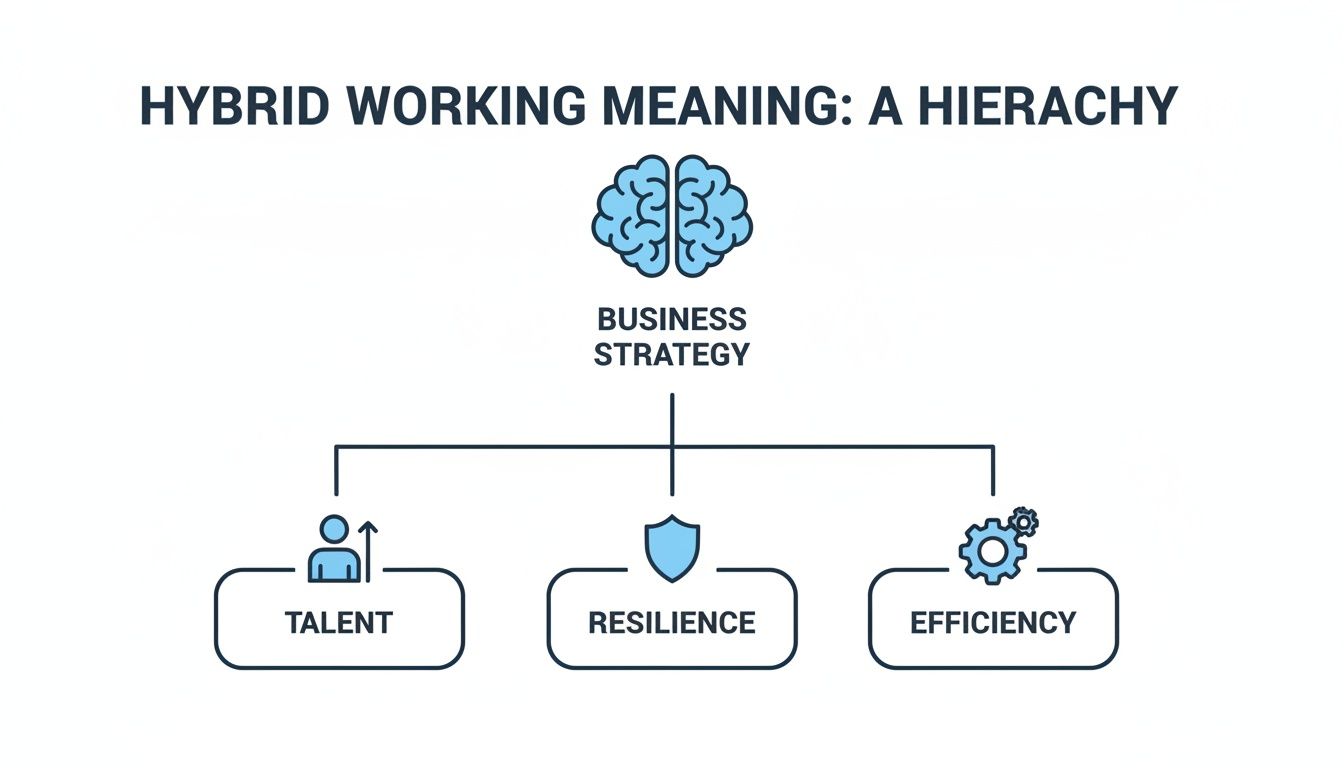
Hybrid work isn't just a staff perk; it's a strategic tool. The model you pick directly shapes how well you achieve those benefits.
Here's a breakdown of the three main models.
Comparison of Hybrid Work Models
| Model | Core Idea | Typical Office Presence | Best For |
|---|---|---|---|
| Office-First | The office is the main hub for work and culture. | 3-4 days per week, with specific days often required. | Companies that rely on in-person collaboration, have strict security needs, or are easing into hybrid work. |
| Remote-First | Work is designed to be location-independent. | Infrequent and intentional, for events like workshops or sprints. | Global tech companies, roles focused on deep individual work, and businesses looking to cut real estate costs. |
| Flexible Hybrid | Trust and autonomy are key; employees choose. | Varies by individual and team, from 0 to 5 days per week. | Results-driven cultures, organizations with a high degree of employee trust, and teams with varied work styles. |
Each model creates a different employee experience and requires a different approach from leadership and IT.
1. Office-First Hybrid
The Office-First model treats the physical office as the primary workplace. Employees are expected to be there most of the time—perhaps three or four days a week—with the freedom to work from home on the other days. This approach maintains a centralized company culture and makes face-to-face collaboration the default.
A typical week might have the team in the office from Tuesday to Thursday for meetings and group projects, leaving Monday and Friday as optional remote days for focused tasks.
This model works well for:
- Organizations with highly collaborative teams that benefit from spontaneous conversations.
- Companies in sectors with strict security or regulatory needs.
- Businesses wanting to try hybrid work without a major operational change.
An office-first strategy provides predictability. Everyone knows where the center of gravity is, which can simplify management. The trade-off is less flexibility, which might not attract talent looking for more autonomy.
2. Remote-First Hybrid
In a Remote-First setup, working remotely is the default. The company operates as if everyone is distributed, even if some people use an office space. Communication is built around asynchronous tools, good documentation is required, and every process is designed to be location-independent.
Here, the office becomes a collaboration hub used for specific events like team-building workshops, project kick-offs, or all-hands meetings, not daily work. A team might work fully remotely for a month, then come together for a planned three-day sprint.
This approach is often a good fit for:
- Tech companies or start-ups sourcing talent from around the world.
- Organizations built on deep, individual work, like software development or content creation.
- Businesses aiming to reduce their real estate footprint and costs.
3. Flexible Hybrid
The Flexible Hybrid model, sometimes called a choice-led model, gives employees the most freedom. There are few, if any, mandated office days. Individuals and teams decide for themselves where they work best, depending on the task and personal preferences.
One person might come in five days a week because they prefer the office, while a teammate comes in once a month for a key meeting. This model is built on trust and autonomy, requiring a management style focused on results, not physical presence.
Real-World Consequences for Business and IT
Going hybrid isn't like flicking a switch. It creates real problems for both daily operations and the IT teams supporting them. The clean theories of hybrid work often meet the messy reality of how people actually behave, and many leaders are caught off guard by the friction.
On the business side, the problems are usually human. Team cohesion can weaken when casual, in-person chats disappear. Communication must be more intentional. If you're not careful, you create two groups: an "in-office" club and an "at-home" silo.
Operational Headaches
The biggest challenge is managing performance fairly. When half your team is in the building and the other half is remote, proximity bias becomes a problem. Managers may unconsciously favor the employees they see every day, giving them better projects or more positive reviews.
This creates practical hurdles:
- Maintaining Team Culture: How do you build a single culture when people have different daily experiences? The spontaneous social bonds that form in an office now have to be scheduled, which feels different.
- Ensuring Fair Visibility: Remote employees can become invisible. They miss the informal conversations where decisions are made, which can slow their careers and make them feel disconnected.
- Rethinking Performance Management: Old metrics based on presence are useless. The focus has to shift to outcomes, requiring a new management mindset and clearer goals.
A hybrid model forces you to be honest about how you measure contribution. If you can't define success without mentioning 'time in the office,' your performance management system is broken.
The IT Infrastructure Strain
For IT departments, the hybrid model introduces chaos. The controlled environment of the office network is gone. In its place are hundreds of individual home networks, each with its own quirks and security flaws.
This change creates a cascade of technical and logistical problems. The IT team is suddenly responsible for supporting people scattered everywhere, using a mix of company laptops and personal devices.
The consequences are immediate:
- Expanded Security Risks: Every remote connection is a potential entry point for an attack. Securing this network demands a zero-trust approach, multi-factor authentication, and endpoint management on every device.
- Complex Asset Management: Tracking who has which laptop, monitor, and keyboard becomes a logistical challenge. Providing tech support gets harder and more expensive when you can’t walk over to someone’s desk.
- Software Licensing Chaos: Managing software licenses gets complicated. Does one person need a license for their office desktop and their home laptop? This can increase the budget and lead to money wasted on unused software.
Both operations and IT have to adapt to a reality where control is distributed. Business leaders need to manage people and culture more intentionally, while IT must secure an infrastructure that no longer has a clear border.
How to Tell If Your Hybrid Strategy Is Working
Deciding to go hybrid is one thing; knowing if it's working is another. Anecdotes and gut feelings aren't enough. You need objective data to see if your strategy is helping people work better or creating new problems.
The goal isn't to check if people look busy. It's to understand how work is getting done. Are people using the expensive collaboration software you bought? Are specialized applications sitting idle on certain days? How much uninterrupted time do teams get for deep work versus being stuck in video calls? These questions define success.
You can gather this data without using employee surveillance. Privacy-first analytics tools focus on aggregated, anonymous work patterns, not what any single person is doing. This gives you objective metrics to make informed decisions.
Moving Beyond Simple Occupancy Metrics
Tracking who swipes a badge at the office is a shallow metric. It tells you where people are, not what they're accomplishing. A better approach is to look at digital activity to understand workflow efficiency and how company resources are being used.
In the Netherlands, for example, office occupancy has climbed from 51% in 2022 to 56% in 2023. Even though many companies have a two or three-day office mandate, attendance often falls short. Yet Dutch firms report high confidence in their hybrid productivity and have turnover rates nearly half that of the US.
This shows that success isn't just about filling desks. It's about creating productive work patterns, wherever they happen. The 2023 State of Hybrid Work report from Owl Labs has more information on these trends.
Key Signals to Monitor
You don't need to track everything. Focus on a few key areas that reflect productivity and resource allocation. This gives you a baseline to measure against as you adjust your hybrid policy.
- Software Adoption and Use: Which applications are being used? By how many people, and for how long? If you rolled out a new tool and usage is low, there's a problem with training or its perceived value.
- Application Underuse: Are you paying for expensive software licenses that are barely being touched? This data is valuable for optimizing your software budget.
- Focus Time vs. Collaboration Overload: How much time are people spending in meetings and chat apps versus uninterrupted time in core software? If "collaboration" consistently fills the day, deep work is likely suffering.
Here’s a dashboard that aggregates application usage. It gives you a high-level view of which tools are essential to your team's workflow.
This kind of big-picture view helps you spot trends without monitoring individuals. It makes it easier to see where your hybrid strategy is helping and where it’s getting in the way.
By collecting the right data, you can move from guessing to knowing. You can build your hybrid work approach on evidence, not assumptions. For a deeper look at how to apply these concepts, read our guide on measuring hybrid work impact.
Building a Practical Hybrid Work Policy
A successful hybrid model runs on clarity. Without a formal policy, you risk confusion, inconsistency, and unfair treatment based on where someone works.
A good policy is a framework, not a tool for control. It gives everyone certainty about how things get done, whether at an office desk or on a laptop at home. This document should be your single source of truth—practical, easy to understand, and covering the essentials from the start.
Defining Communication and Collaboration Rules
The most common friction point in a hybrid setup is communication. Your policy must set clear expectations to prevent an "us vs. them" mentality between remote and in-office teams.
Start by establishing core collaboration hours—a set window, maybe 10 a.m. to 3 p.m., when everyone is expected to be online and available for meetings. This protects deep-focus time outside those hours while ensuring synchronous work can happen.
Also, mandate a "digital-first" communication rule. The principle is simple: if one person is joining remotely, everyone joins the call from their own device. This prevents remote team members from feeling like they're eavesdropping on a conversation happening miles away.
Setting Technology and Security Standards
Your policy needs to standardize tools and security practices for the entire team. This is about fairness and operational stability.
Outline the minimum requirements for a home office, like internet speed and essential equipment. Be specific about what the company provides, what it reimburses, and what the employee is responsible for. This could include:
- Equipment Stipends: A one-time payment or an annual allowance for monitors, ergonomic chairs, and other gear for a comfortable and productive home office.
- IT Support: Clearly define what your IT team will and will not support. Will they help troubleshoot a personal router, or is their scope limited to company-owned hardware?
- Security Protocols: Make multi-factor authentication (MFA) and the use of a company VPN mandatory for accessing any internal systems. No exceptions.
Setting these standards creates a level playing field and protects the company network. It's also worth understanding the costs; you can use a remote work savings calculator to see how stipends compare to savings from reduced office space.
Making Office Days Purposeful
Forcing people into the office on "anchor days" without a clear reason leads to resentment. No one wants to commute just to sit on video calls they could have taken from home. The policy should frame office time as a resource for specific activities.
Use office days for collaboration that benefits from being in the same room: strategic planning, brainstorming, team-building, and onboarding new hires. Discourage people from using this time for solo tasks that require deep concentration.
This approach makes the commute feel worthwhile and reinforces the value of your physical workspace.
Finally, your performance review process must be explicitly location-agnostic. Train managers to evaluate people based on outcomes and contributions, not on how often they see them in the hallway. This is the most important step in building a hybrid culture that is fair and sustainable.
Common Questions About Hybrid Work
Once a company goes hybrid, managers and employees have questions. Moving from a policy document to day-to-day reality always brings up practical concerns. Here are straight answers to the most common ones.
How Do You Ensure Fairness for Everyone?
Fairness in a hybrid model depends on one idea: focus on outcomes, not presence. Performance must be measured by results, not where someone was sitting when they produced them.
This requires changing how teams work. You have to standardize communication so everyone gets critical information at the same time. A good rule is to document every major decision in a shared digital space, like a project management tool or a team wiki. This prevents the "in-office" group from gaining an unfair advantage from a hallway chat.
Managers also need training to recognize and fight "presence bias"—the natural tendency to favor the people we see every day. Structured, regular check-ins with every team member are essential. It's also vital to ensure remote staff get equal opportunities for high-profile projects and promotions.
What Is the Biggest IT Security Risk?
The single biggest risk is the expanded attack surface. When your team works from dozens of different, often unsecured, home networks, your company becomes an easier target for cyberattacks. People using personal devices or public Wi-Fi can put sensitive company data at risk.
The answer is a layered defense, what the security world calls a zero-trust approach. You don't automatically trust any connection, even if it seems to be coming from inside your network.
Practical steps include:
- Mandatory VPNs: Insist that everyone uses a Virtual Private Network (VPN) to access any company system.
- Multi-Factor Authentication (MFA): Enforce MFA on every app and service, from email to internal dashboards.
- Endpoint Security: Use tools that monitor the health and compliance of every device trying to connect, whether it's company-issued or personal.
- Regular Training: Security isn't a one-time memo. Run ongoing awareness training to help your team spot phishing emails and other common tricks.
Can We Measure Productivity Without Intrusive Monitoring?
Yes, and you must. Good measurement is about understanding work patterns with aggregated, anonymous data—not about spying on individuals. Tools that log keystrokes or take screenshots destroy trust and rarely provide useful information. They only show if someone is active, not if they're productive.
A better approach is to analyze how systems and tools are being used across the organization. The goal is to find and remove roadblocks, not to judge individuals.
Platforms like WhatPulse can measure application usage, time spent on projects, and overall focus time across entire teams. This data helps answer big questions:
- Are we using the expensive software we pay for every month?
- Is "collaboration overload" from constant meetings and messages preventing deep, focused work?
- Are there digital friction points in our common workflows that are costing us time?
This approach helps you improve how work gets done. It can also provide clues about employee wellbeing—for instance, data can help you balance app usage to prevent burnout. The focus shifts from policing people to improving the system.
At WhatPulse, we provide the privacy-first analytics needed to understand how work happens in your hybrid team. Our platform offers actionable insights into application usage and productivity patterns without breaking employee trust. See how you can start making data-driven decisions by visiting https://whatpulse.pro.
Start a free trial