
This isn't a simple choice between two time tracking tools. It's about deciding on a philosophy for how you measure work. Do you need to track time for billing, or do you need to understand how work gets done?
The answer to that question puts Harvest and WhatPulse Professional in two different categories. Harvest is built for billing clients. It logs hours against projects to create invoices. WhatPulse is built to give you a clear picture of your team's digital activity, helping you find workflow friction and optimize how you use software.
Your choice comes down to one question: is your goal to invoice customers or to improve your internal operations?
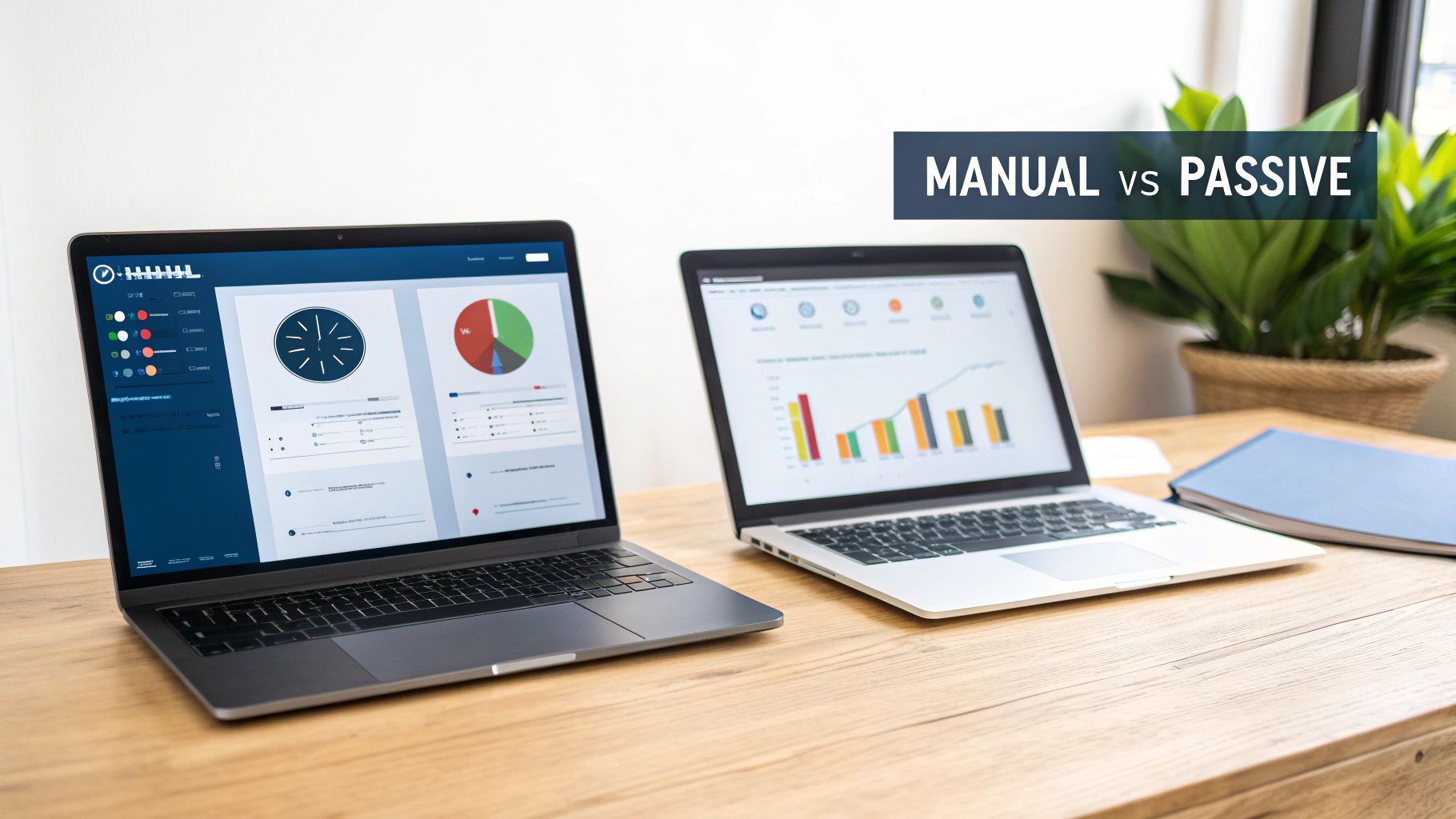
Manual Tracking vs. Passive Measurement
The core difference between these two platforms is their data model. One is active, requiring people to tell it what they're doing. The other is passive, capturing what's happening in the background without user input.
This single distinction drives everything else.
With Harvest, your team is responsible for starting and stopping timers or filling out timesheets after the fact. It’s a manual process that directly links a block of time to a specific project or task. The data is clean, explicit, and ready for an invoice because a person has already assigned it meaning.
WhatPulse works differently. It runs a lightweight application on each computer that passively captures endpoint activity—like which applications are open and for how long. It doesn't know why you were using Photoshop, only that you were. This creates an objective, minute-by-minute log of digital work without anyone needing to do anything.
Harvest vs WhatPulse At a Glance
This table breaks down the core differences in their approach and the business problems they solve.
| Criterion | Harvest | WhatPulse Professional |
|---|---|---|
| Data Model | Manual Entry (Active) | Passive Capture (Automated) |
| Primary Goal | Billing & Invoicing | Operational Analytics |
| Key Question Answered | "How many billable hours did we work on Project X?" | "How is our team's time actually being spent?" |
| Strength | Financial Accuracy for Clients | Internal Process Optimisation |
They aren't really competitors. They're designed to answer completely different business questions.
The entire Harvest experience is built around its manual, project-centric model, with a focus on timesheets and budgets.
This setup is ideal for seeing where billable hours are going and keeping projects on budget. The workflow is designed to translate an employee's time into a line item on an invoice. If you want a deeper dive into these concepts, you can explore the difference between tracking vs measuring in our guide.
The 'best' tool depends on the question you need to answer. If your question is about invoicing, Harvest is the direct answer. If it's about workflow efficiency or software spend, you need a different dataset.
Data Capture Methods and Privacy Implications
The way a tool gathers data shapes its strengths and limitations. Harvest is built around a straightforward, manual model. The user starts and stops a timer or fills in a timesheet later, linking each chunk of time to a specific project or task.
This approach is explicit. A person is declaring, “From 10:00 to 11:30, I was working on the ‘Website Redesign’ project.” The output is clean, pre-categorized, and ready for an invoice. The catch? Its accuracy depends on human discipline.
We know how that goes. Timers get left running. People forget what they did Tuesday morning. All the small, non-billable but necessary tasks disappear. This method demands constant effort from everyone on the team to keep the data reliable. What you get is a record of what was billed, not necessarily a true picture of how work time was spent.
Passive Endpoint Capture
WhatPulse works on a different principle. It uses a lightweight client application installed on each computer to passively and automatically log what’s happening. It notes which applications are active and measures keyboard and mouse interactions, creating an unbroken record of digital work as it happens.
This automated capture is objective. It doesn’t rely on memory or need anyone to remember to click a button. The data reflects the reality of a workday, catching the small, unlogged tasks and interruptions that manual systems miss.
It captures metrics like application usage time, giving IT leaders a clear, unfiltered view of software adoption. For instance, you can finally see if that expensive software license is gathering digital dust—a question Harvest can’t answer.
The core difference comes down to intent versus reality. Harvest records declared, billable intent. WhatPulse measures actual, unfiltered activity. One is for justifying costs to clients; the other is for understanding your own internal operational reality.
Privacy and Compliance Considerations
How you collect data has a direct line to privacy. Both tools must navigate regulations like GDPR, but their different models create different challenges and solutions. Harvest’s data is user-generated, tied directly to individuals and the projects they bill.
While that sounds simple, the act of tracking employee hours for billing can feel like individual performance monitoring. The focus is on the person and their billable output, which demands clear communication with your team about how that data is being used.
WhatPulse was designed with privacy at its core. The client captures activity data, but it absolutely does not record screen content or keystrokes. The focus is on aggregate, anonymized metrics that answer questions about team-level behavior, not individual surveillance. For a deep dive into this, you can learn more about WhatPulse's approach to privacy and the specific data collected.
Here’s the breakdown:
- Harvest's Privacy Model: Relies on user consent and transparency around billing. The data is inherently personal, linked to individual output and project work.
- WhatPulse's Privacy Model: Built on data aggregation and anonymization. It measures application usage and activity patterns without looking at the content of the work itself.
This distinction is important for getting team buy-in. Passive tracking can feel invasive if not handled with care. WhatPulse avoids this by collecting non-sensitive metadata—the what and how long, not the content. This aligns with privacy-by-design principles, positioning it as a tool for operational analysis rather than employee supervision. The goal is to see if a team is spending 80% of its time in development environments or getting pulled into meetings, not to read their code or private messages. This approach builds trust while still delivering the insights you need to optimize resources and workflows.
Comparing Features and Integration Ecosystems
Beyond the core data models, the feature sets for Harvest and WhatPulse tell two different stories about why they exist. One is built around the financial lifecycle of a project, connecting time entries to invoices. The other is built for internal analysis, focused on understanding how work actually happens.
Harvest's power is in its financial toolkit. It tracks time and turns it into billable hours. You can log expenses, attach receipts, and generate professional invoices without leaving the platform. It provides a complete workflow for any service-based business that bills clients for their time.
WhatPulse doesn't handle invoicing or expense tracking at all. Its features are for operational intelligence. You get dashboards showing application usage, helping you spot unused software licenses. You can see real-time, anonymized data on team activity, giving you a grounded view of where focus is being spent.
Financial and Project Management Features
For Harvest, the primary goal of tracking time is to support billing. Every feature is a step in that direction.
- Time and Expense Tracking: Users can log hours against specific projects and tasks. They can also record expenses, like travel or materials, and upload photos of receipts.
- Invoicing and Payments: Harvest generates invoices directly from logged time and expenses. It connects with payment gateways like Stripe and PayPal, allowing clients to pay from the invoice.
- Project Budgeting: You can set up project budgets based on hours or fees. The system sends alerts as you approach your limits, which helps prevent scope creep.
When looking at time tracking tools, it’s worth thinking about how they fit with other business functions. Managing expenses often involves its own complex workflows, leading some companies to adopt specialized expense tracking solutions to automate and verify these processes.
Internal Analytics and IT Management Tools
WhatPulse skips the financial layer to focus on a different set of problems. Its feature set is designed for IT and operations leaders who need to understand resource allocation and workflow efficiency.
- Application Usage Monitoring: See exactly which applications are being used, for how long, and by which teams. This data is critical for identifying underutilized software and optimizing license spend.
- Real-time Activity Dashboards: Get an aggregated, anonymized view of team activity. This helps measure things that manual time tracking often misses, like the real impact of frequent meetings on focused work.
- Profiles for Project Focus: Instead of billing codes, you create "Profiles" that automatically track time spent in specific sets of applications. An "Engineering" profile might track time in IDEs and terminals, while a "Design" profile tracks time in Figma and Adobe CC.
This approach gives you a more realistic picture of how work gets done, free from the bias of manual entry.
The decision is straightforward. If you need to send an invoice based on hours worked, Harvest has the features you need. If you need to decide whether to renew 100 expensive software licenses, WhatPulse provides the data to make that call.
The Integration Ecosystem
A tool's power often comes from how well it works with the other software you use. Here again, the two platforms have different philosophies.
Harvest's integrations are built to streamline the project billing cycle. It connects directly with popular project management and accounting software.
- Project Management: Pull tasks from tools like Asana, Trello, or Jira directly into Harvest to log time against them.
- Accounting: Sync invoices and payments with platforms like QuickBooks Online and Xero, keeping your financial records consistent.
- CRM and Proposals: Connect with tools to turn a sales proposal into a project and start tracking time immediately.
WhatPulse’s integration strategy is different. It's not about connecting to other SaaS platforms directly; it’s about making its raw data available for your own analysis. Its main integration point is its API and data export capabilities, which let you pull endpoint data into your own business intelligence (BI) tools. For those who prefer a simpler method, you can find more information on how to work with WhatPulse's detailed CSV exports in our guide.
For instance, you could feed WhatPulse's application usage data into Power BI or Tableau. There, you could blend it with HR data on team roles and financial data on software costs to build custom dashboards. This allows for a much deeper, more tailored analysis of operational efficiency than any pre-built integration could offer. One tool streamlines a specific workflow; the other provides the raw material for deep business intelligence.
Real-World Scenarios for Operations and IT Teams
Features on a webpage are one thing; solving a business problem is another. The choice between Harvest and WhatPulse becomes clearer when you map them to specific, real-world situations. The right tool depends on the problem you are trying to solve.
For a digital agency that bills its clients by the hour, Harvest is the logical choice. Their business model rests on accurately tracking and invoicing employee time against client projects.
A typical workflow looks like this:
- A project manager sets up a new client project in Harvest, defining tasks and setting an hourly budget.
- Designers and developers start the Harvest timer when they begin work on a task.
- At the end of the month, the project manager reviews the timesheets, confirms the billable hours, and generates an invoice.
In this scenario, Harvest solves the core business need. The goal is financial accountability to an external client, and the manual, project-based time tracking Harvest provides is built for exactly that.
Optimising Software Spend in a Large Enterprise
Now, consider a different problem. An IT director at a company with 1,500 employees needs to decide whether to renew their enterprise agreement for Adobe Creative Cloud. The annual cost is significant, and they suspect many of the licenses are underutilized.
Harvest can't help here. Asking employees to manually log their time in Photoshop is impractical and would yield unreliable data. The IT director needs objective, passive usage data. This is a clear use case for WhatPulse Professional.
The IT director would use the WhatPulse dashboard to view aggregated, anonymized application usage data. They can filter by department to see exactly how many hours Creative Cloud applications were actively used over the last quarter.
The dashboard might reveal that while the design department uses the software daily, 40% of the licenses assigned to the marketing team have been used for less than two hours in the past 90 days. Armed with this data, the director can reallocate those licenses and reduce the renewal cost.
Measuring Developer Focus and Meeting Overload
An engineering team lead notices her team is consistently missing sprint deadlines. She suspects the cause isn't a lack of effort, but constant interruptions and excessive meetings.
Manual time tracking is useless for diagnosing this. A developer might log "8 hours on Project Phoenix," but that simple entry hides the reality of a workday fragmented into a dozen pieces. The lead needs to see the pattern of work, not just the total hours.
Using WhatPulse, she can create a "Development" Profile that automatically tracks time spent in applications like VS Code, Docker, and terminal windows. The anonymized team dashboard will show her two critical metrics:
- Focus Time: The amount of time spent in the "Development" application profile without significant interruption.
- Context Switching: How often the team is pulled out of their core development tools and into communication apps like Slack or Teams.
If the data shows the average focus session is only 15 minutes long, the lead has concrete evidence to justify implementing "no-meeting Wednesdays" or dedicated blocks of protected focus time. This is a problem of workflow optimization, not billing.
The dashboard provides a visual representation of how teams are allocating their time.

This kind of aggregated data helps leaders spot team-wide patterns in software use and focus without monitoring individuals.
Understanding Part-Time and Hybrid Work Patterns
Passive tracking also offers a clearer picture in organizations with many part-time or hybrid employees, a common model in the Netherlands. Manual logging is often inconsistent for staff with fragmented schedules, making it hard to get an accurate sense of resource use.
Recent occupational surveys in the Netherlands show that Dutch workers spend a significant portion of their workday sitting, averaging 4.5 hours during work. This is happening within an average working week of just 32.1 hours, one of the lowest in the EU. This suggests that for many, work time is highly concentrated. You can explore more about these Dutch working condition findings.
For leaders using WhatPulse, this means passive data like application usage will provide a dense, accurate signal during on-screen hours, but metrics must be interpreted in the context of potentially fragmented schedules.
For a digital agency, time is the product. For an enterprise IT department, time is an operational metric. The former needs Harvest to sell their product; the latter needs WhatPulse to optimize their operations.
Analysing Cost, Licensing, and Scalability
The financial models for Harvest and WhatPulse reflect their core philosophies. One ties its cost directly to people, while the other ties it to the devices they use. Understanding this distinction is key to figuring out your total cost of ownership.
Harvest uses a straightforward per-user, per-month pricing model. It's simple to understand and easy to budget for if your team size is stable. If you have ten people, you pay for ten licenses. Hire five more, and you add five more licenses. It’s direct.
This model is a perfect fit for teams where almost everyone needs to track billable hours. But it can become financially inefficient if you have people who only need to log time occasionally—like managers who just approve timesheets but don't bill clients. You're paying the full price for every seat, no matter how much it's used.
Device-Centric Licensing
WhatPulse Professional prices its service per-computer, per-month. This approach uncouples licensing from your individual user count. For organizations managing a fleet of devices, this can be more cost-effective, particularly in places with shared workstations.
For an IT department, this model aligns with asset management. You're paying to monitor the activity on a device, not for every person who might touch it. This can lead to significant savings in larger companies where headcount fluctuates more than the number of deployed computers.
The choice in licensing is a choice between headcount and infrastructure. Harvest costs scale with your team size. WhatPulse costs scale with your device count. This defines their respective scalability paths.
Contrasting Scalability Models
Scalability isn’t just about whether a tool can handle more data; it's about how the tool and its cost adapt as your business changes. With the time tracking Harvest offers, scalability is tied to your headcount. As you bring on more billable staff, your costs increase in a predictable, linear way. The platform is built to handle more users and projects, but your financial investment grows with your team.
WhatPulse scales with your physical or virtual infrastructure. Its value increases as you deploy its client across more devices, giving you a broader picture of software usage and operational patterns. For an IT director, the goal is often to get to 100% coverage of company endpoints to pull accurate data for software asset management. The cost scales with this infrastructure footprint, not with the number of employees. If you want to dive deeper into this kind of thinking, it's worth exploring broader cloud cost management principles, as many of the concepts apply here.
This difference frames WhatPulse as a tool for operational oversight, where your investment is aimed at optimizing a much larger cost center—your entire software and hardware budget. The financial analysis for each tool, therefore, must reflect its primary job. Are you funding a billing utility or an infrastructure optimization platform?
Making the Right Choice for Your Business
Choosing between Harvest and WhatPulse isn't about finding the "better" tool. It’s about figuring out which one solves the business problem you're facing. The right choice depends on the one question you need to answer.
If your main headache is inaccurate client billing or justifying the hours your team spends on projects, Harvest is built for you. Its entire design—from time entry to invoicing—is focused on turning employee hours into clear, billable revenue. It answers the question, “How much do we bill for this project?”
If your problem is a bloated software budget or a feeling that your teams are drowning in distractions, WhatPulse delivers the data you need. It’s designed for internal analysis, helping you see how resources are really being used and where friction exists. It answers the question, “How are our time and software budget actually being spent?”
A Clear Decision Framework
To make a confident decision, ask these direct questions.
- Is our primary challenge inaccurate client billing or wasted software spending?
- Do we need to justify time to external clients, or understand how that time is being used internally?
- Is our goal to improve project profitability, or to optimize internal workflows and IT assets?
Your honest answers will make it clear whether you need a financial tool or an operational analytics platform.
This chart breaks down the cost model, showing how each platform's pricing scales with your organization.
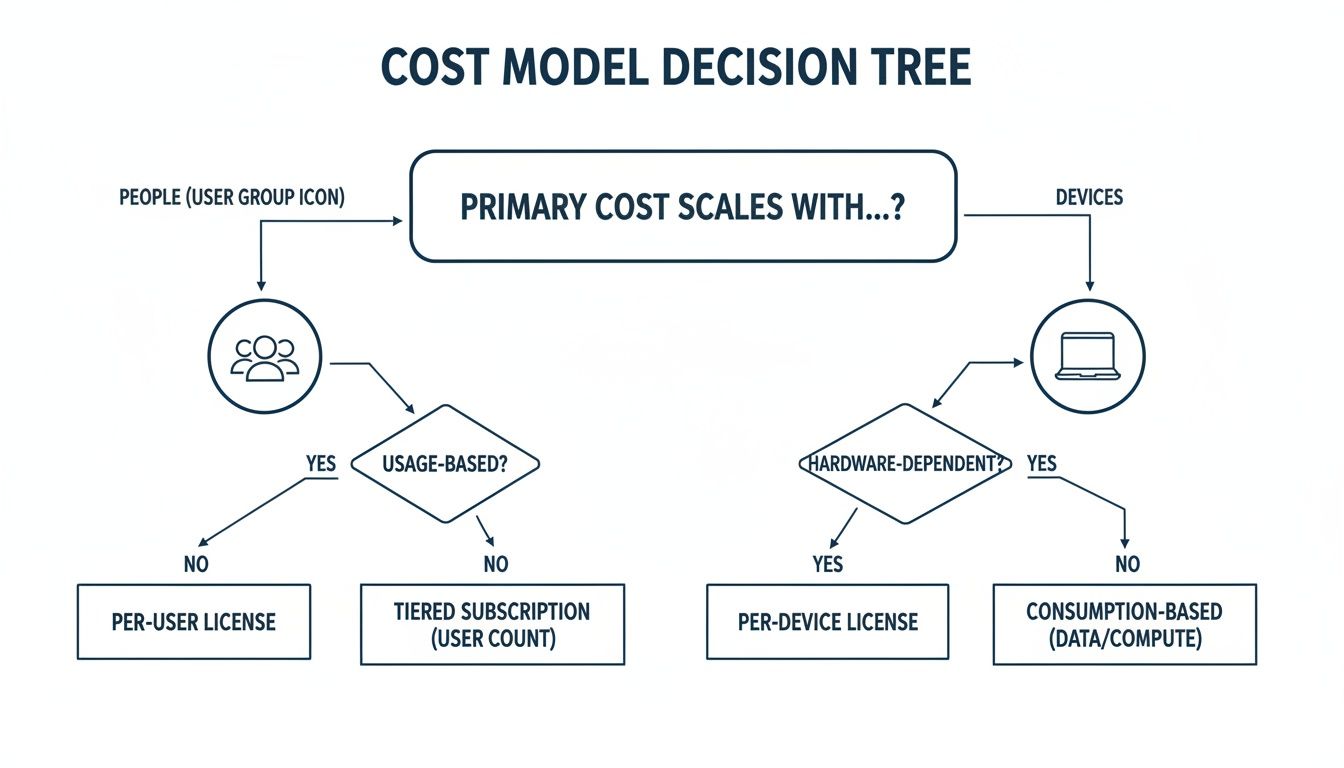
As you can see, Harvest costs scale with your people, while WhatPulse scales with the number of devices you manage.
Combining Both Tools for Complete Visibility
For some organizations, the answer isn't "either/or." A more mature business might find value by using both tools together.
Use Harvest for its intended purpose: financial tracking and client invoicing. Use WhatPulse for what it does best: internal analytics on software usage and team focus.
This dual-stack approach allows a business to maintain precise, billable records with time tracking Harvest provides, while also gaining deep insights into operational efficiency from WhatPulse.
Consider a practical example. In the Netherlands, the average work week is just 32.1 hours—one of the shortest in Europe. With such concentrated work time, understanding exactly how those hours are spent becomes critical. The high prevalence of part-time work means that looking at raw project hours can be misleading. Normalizing that data against actual application usage is essential to avoid misinterpreting productivity. You can find more data on European working hours on Eurostat's website.
Ultimately, the right tool is the one that solves your most pressing problem. Choose Harvest to fix your billing. Choose WhatPulse to fix your operations.
Common Questions
When comparing a manual time-tracking tool like Harvest with a passive analytics platform like WhatPulse, a few key questions usually come up. The right choice depends on what you’re trying to achieve, but the details make the decision much clearer.
How are the reports different?
Harvest is built around finance. Its reports show you billable versus non-billable hours, track how a project is doing against its budget, and give you a sense of your team's capacity. The reporting suite is designed to answer questions about profitability and invoicing.
WhatPulse answers operational questions. Its dashboards reveal which applications your team is actually using, helping you spot underutilized software licenses. You can analyze focus time versus context switching, giving you the data needed to improve how your team works. It reports on how resources are used, not how they're billed.
Which tool is better for a remote or hybrid team?
Both can be useful, but they solve different problems for distributed teams. Harvest is great for agencies with remote staff who bill by the hour. It creates a straightforward log of work that you can use to invoice clients with confidence.
WhatPulse is designed to help you understand how work gets done when everyone isn't in the same room. It can show you if your remote team is bogged down in meetings instead of deep work, or if they’re actually using the software stack you’ve paid for.
Harvest tracks the time you bill for. WhatPulse helps you understand how that time is actually spent. For remote teams, knowing the difference is key to both productivity and profitability.
Dutch workers historically log fewer annual hours than many of their OECD peers, averaging around 1,643–1,650 hours per year. This is a crucial piece of context for managers of Dutch engineering teams using a tool like WhatPulse to benchmark performance. You'll want to base your project estimates and license costs on this local baseline—not a higher international norm—to avoid misinterpreting the data. You can learn more about Dutch workweek norms and their impact here.
Ready to move beyond manual time tracking and get a true picture of your team's workflow? WhatPulse provides the privacy-first analytics you need to optimize software spend and improve focus. Discover how WhatPulse Professional can help your team.
Start a free trial