

When people hear "app blocker," they usually think of parental controls or personal focus tools. In a business, an app blocker app serves a different purpose. It's less about blocking social media and more about enforcing software policies across all company devices.
Think of it as a digital gatekeeper for your company’s tech environment.
Defining the App Blocker App in a Business Context
 For an IT department, an app blocker isn't a productivity hack. It's a security tool that gives administrators control over the company’s software ecosystem. Instead of a free-for-all where employees can install anything, the business decides what’s allowed.
This control is necessary. Unmanaged applications are a common entry point for malware and data breaches. An employee might download a seemingly harmless utility from the web that is bundled with malicious code.
Or, they might use an unapproved file-sharing app, storing sensitive company data on insecure third-party servers outside of your control. Suddenly, you have a security gap you didn't even know existed.
Core Strategies for Application Control
Controlling apps comes down to two main philosophies: allowlisting and blocklisting. Each offers a different balance of security and administrative effort.
- Allowlisting: This is the most secure and restrictive method. You create a list of pre-approved applications, and only those apps can run. Everything else is blocked by default. It provides maximum security but requires hands-on work to keep the list current.
- Blocklisting: This is a more relaxed approach. By default, all applications can run except for those on a specific forbidden list. It's easier to manage day-to-day but is less secure because it can't protect you from new or unknown threats that aren't on the list yet.
The right choice depends on your organization’s risk tolerance. A financial services firm handling sensitive data will likely use a strict allowlist. A creative agency might opt for a flexible blocklist to avoid slowing down work.
Beyond Security Hardening
Locking down apps is the main goal, but application control solves other business problems. It helps meet compliance standards like GDPR or other industry regulations that dictate how data must be handled. By blocking non-compliant software, you can avoid large fines and legal issues.
It also helps manage software licensing costs. When you restrict unauthorized commercial software, you eliminate the legal and financial risks of unlicensed copies on your network. Central control ensures your organization is secure, compliant, and financially responsible.
The Hidden Dangers in Unmanaged Apps
It’s easy to dismiss unmanaged applications as a distraction. The reality is more serious—they are active threats to your organization's security and finances.
The most obvious risk is malware. An employee downloads a free utility to get a job done faster, but hidden inside is code designed to steal credentials or launch ransomware on your network. It happens easily.
Then there is the constant threat of data leaks. When employees use unapproved cloud storage or messaging apps, they create backdoors for sensitive company information. These services almost never have the security protocols your business requires, making them targets for attackers. One file shared the wrong way can expose client lists, financial records, or your next project.
The Problem of "Shadow IT"
There's a name for this: shadow IT. It’s what happens when teams or individuals use technology without approval from the IT department. Most of the time, they are just trying to find a better tool to be more productive. But the fallout can be significant.
Shadow IT creates a web of fragmented data. Information gets trapped in separate, disconnected systems. This makes it impossible to get a clear picture for business analytics and leads to integration problems and wasted money. It's not uncommon for an audit to find three different teams paying for three different project management tools, all because no one had a central view.
A marketing team member uses a popular free file-transfer site to send a large design file to a vendor. It’s quick and convenient, but the service has a known security flaw. In that one click, they could have exposed a folder of client campaign materials to the public internet. That’s a data breach.
Financial and Compliance Headaches
The problems don't stop with technical glitches. Using unlicensed commercial software can put a company in legal trouble, with software vendors issuing penalties that are far higher than the license costs.
On top of that, regulations are getting stricter. For instance, the Dutch Authority for Consumers and Markets (ACM) has increased its scrutiny of app store practices, pushing for more transparency and control over data collection. You can read more about how Dutch foundations are challenging app store models to see where this is headed. Using unvetted shadow IT apps that sidestep these rules is a compliance risk, as they're unlikely to meet regional data protection standards.
This is where a solid app blocker app becomes necessary. It’s a basic control for preventing these unvetted and risky tools from getting a foothold in your network.
Blocking Apps Versus Monitoring Usage
When managing software in your company, you face a choice. Do you build walls with an app blocker app, or do you open a window with monitoring to see what's happening? Each approach has its place, but they create different work environments.
The most direct approach is to block apps. This is a high-control, low-trust model that is required in environments where security is the top priority. For financial institutions or government contractors, the risk from a single unauthorized app is too high. It’s a simple method that leaves no room for ambiguity.
But that rigidity has a price. It can stifle employee autonomy and make it difficult to adopt new, useful tools. What happens when a team discovers a better project management app? They hit a wall. Innovation slows, and employees can feel that their judgment isn't trusted, which damages morale.
The Case for Informed Governance
Monitoring offers a different path. Instead of starting with restrictions, you start with data. By observing how applications are used, you get a clear, unbiased picture of how work gets done. This lets you build a governance policy based on facts, not assumptions.
This approach often reveals surprising insights. You might discover one department relies heavily on a tool you were about to decommission. Or you could find that three different teams are all paying for separate software with nearly identical features—an instant opportunity to cut costs.
Monitoring lets you have informed conversations. You can go to a team and ask why they’re using an unapproved app. Maybe it solves a problem that your standard software suite doesn't. That feedback is valuable for evolving your IT strategy and supporting your people.
The flowchart below shows why this visibility is so important, laying out the risks that unmanaged applications introduce.
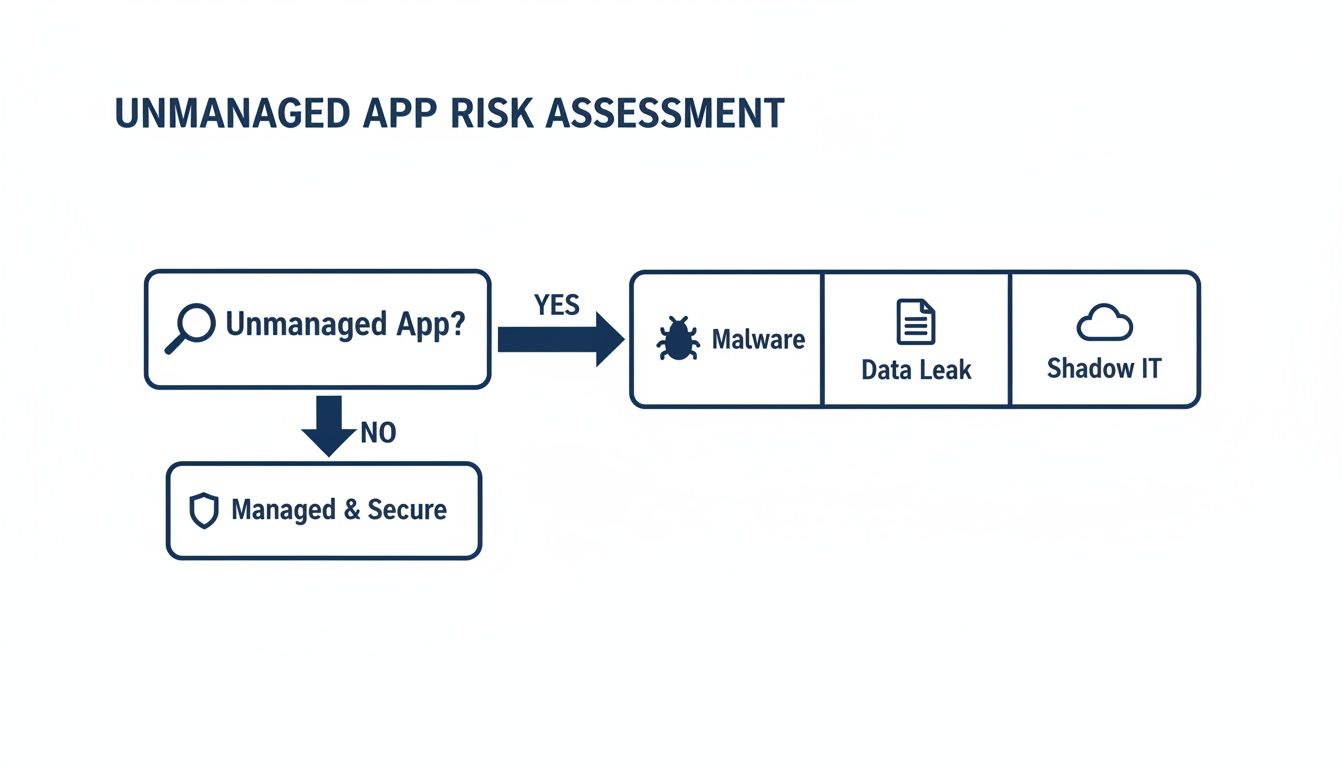
This decision tree shows how one unmanaged app can lead to security vulnerabilities like malware, data leaks, and the chaos of shadow IT.
To make the choice clearer, let’s compare the two strategies.
Comparing App Blocking and App Monitoring Strategies
| Attribute | App Blocking (Restrictive Control) | App Monitoring (Informed Governance) |
|---|---|---|
| Primary Goal | Prevent unauthorized app usage immediately. | Understand software usage to guide policy. |
| Trust Model | Low-trust; assumes unapproved apps are a direct threat. | High-trust; assumes employees have valid reasons for their tool choices. |
| Flexibility | Rigid. New tools require a formal approval process, which can be slow. | Flexible. Allows for discovery and evaluation of new tools based on real data. |
| Impact on Culture | Can feel restrictive and lead to employee frustration or workarounds. | Fosters transparency and collaboration between IT and teams. |
| Data Insight | Minimal. You only know what's blocked, not what's needed. | Rich. Provides data on app adoption, redundancy, and workflow gaps. |
| Best For | High-security, compliance-driven environments (e.g., finance, government). | Agile, innovative organizations that want to balance security with productivity. |
The choice isn’t always one or the other; a hybrid approach often works best.
Finding the Right Balance
A purely restrictive policy often pushes employees to find workarounds, which can create bigger security blind spots. A data-driven approach allows for more nuance. You might decide to approve a popular app after reviewing its security profile, or you could find a better, more secure alternative that meets the same need.
Tools like WhatPulse deliver these usage insights without invasive surveillance. It shows you which applications are being used, for how long, and by which teams—all without capturing keystrokes or screen content. This allows you to make evidence-based decisions about your software policy instead of falling back on blunt restrictions that can hurt productivity.
Blocking is a powerful tool, but it’s most effective when guided by real-world data from monitoring. Many companies find that a smart combination of both strategies is the best path. For a broader look at managing workplace focus, you can explore these 15 tools to minimise digital distractions.
How to Implement Effective Application Control Policies
Rolling out an app blocker app or any application control isn’t something you can do overnight. A heavy-handed approach will likely backfire. You’ll end up with frustrated employees and a new wave of shadow IT workarounds.
A successful implementation has to be collaborative.
It starts with getting a baseline. Before you can make rules, you need to understand what’s happening on your network. What applications are people using to get their jobs done? Which tools are critical for specific departments? Data from a monitoring tool gives you this starting point.
Start with Communication, Not Configuration
Once you have a baseline, the next step is to talk to people. Schedule meetings with department heads and team leads. Your goal is to understand their workflows, the tools they rely on, and any frustrations they have with the current software.
Don't skip this. The insights you gain will stop you from blocking software the finance team uses for a monthly report or a design tool the marketing team needs daily.
Building Your Policy Framework
With usage data and team feedback, you can start building the policy. This usually means creating either an allowlist (where only approved apps can run) or a blocklist (where known-bad apps are forbidden). For most organizations, a hybrid approach works best.
Your initial policy should cover the essentials:
- High-Risk Software: Block applications known for security vulnerabilities, like outdated file-sharing clients or software with a history of malware.
- Redundant Applications: If you find three teams using three different paid project management tools, standardize on one and block the others to save money.
- Core Business Tools: Formally add all essential business software to your approved allowlist. This ensures they always function correctly.
An effective policy isn't static. It needs a clear process for employees to request exceptions. If someone needs a new tool, they should know how to submit it for a security review.
Plan a Phased Rollout
Don't deploy a new application control policy to the entire company at once. Start with a pilot group, perhaps the IT department or another tech-savvy team. This lets you test the policy, fix problems in the exception process, and gather feedback before a wider launch.
To fortify your business against digital threats, integrate app blocking strategies within advanced cybersecurity frameworks.
A gradual, department-by-department rollout minimizes disruption and gives your support team time to handle any issues. For more on controlling software on different devices, you might be interested in our guide on mobile app management. This measured approach helps you build a system that is both secure and practical.
Gaining Visibility with Privacy-First Analytics

An app blocker app gives you direct control, but it doesn't tell you why your team uses certain tools. Monitoring can provide this information, but traditional surveillance can destroy employee trust. The answer is to gather data ethically with privacy-first analytics.
This method is about insight, not surveillance. Instead of capturing invasive details, a privacy-first platform like WhatPulse collects only the metadata needed to understand how software is being used across the organization.
What Privacy-First Data Looks Like
The goal is to answer business questions without spying on individuals. This means collecting specific, non-invasive data points that reveal broad patterns, not personal habits.
What gets collected:
- Application Name: Which software is running (e.g.,
Microsoft Word,Slack). - Active Usage Time: How long an application is the main focus on screen.
- Device Information: Operating system and application versions to track updates.
What never gets collected:
- Keystrokes or the order of keyboard input.
- Screen content or screenshots.
- Website URLs or browser history.
- Personal data from inside applications.
This aggregate data gives you a high-level view of your digital workplace. You can see which tools are important and which are unused, all without crossing ethical lines. As you design your approach, make sure it aligns with your organization's privacy policy.
Turning Aggregate Data into Business Decisions
With this visibility, IT governance can become proactive instead of reactive. The data uncovers opportunities for improvement and cost savings that were previously hidden.
For instance, the widespread use of personal apps on work devices often points to a larger trend. In the Netherlands, Snapchat’s user base recently hit 8.36 million, which is 45.5% of the population. This shows how fragmented attention has become, making it important for IT leaders to understand application patterns with analytics that respect privacy.
This kind of data isn’t about checking up on one person; it’s about understanding the entire organization. It helps you see the forest, not just the individual trees.
With these insights, you can connect monitoring directly to business outcomes. You can pinpoint underused software licenses wasting money on renewals, track adoption of new tools, and spot software redundancies where standardization could save money. You can learn more about how to optimise work patterns with data transparency in our deeper dive.
This positions analytics as an intelligent alternative to heavy-handed blocking, helping you build policies based on evidence, not assumptions.
Common Questions About App Control
When IT leaders consider an app blocker app or a monitoring strategy, the same questions tend to come up. The goal is always to improve security and efficiency without making work harder for employees. Here are the things we hear most often.
Will an App Blocker App Crush Employee Morale?
It can, but only if you handle the rollout poorly. If you impose a strict blocking policy with no explanation, you're almost guaranteed to frustrate people who depend on certain tools. It tells them you don't trust them.
A better way to start is with understanding. Before you block anything, use monitoring to see what applications people are using and why. That data gives you a basis for conversations with department heads, letting you build policies around real workflows.
When you do implement controls, be open about the security reasons. Also, create a simple way for people to request an exception. This changes the dynamic from a restrictive order to a joint effort in keeping the company secure, which makes a difference for morale.
What’s the Difference Between an Allowlist and a Blocklist?
These are two different ways of thinking about app control. Which one is right for you depends on your company's security needs and how much administrative work you're willing to do.
- Allowlist: This is the "default deny" model. You create a list of approved applications, and only those can run. Anything not on the list is blocked. It's very secure but takes more work to keep updated.
- Blocklist: This is the "default allow" model. Everything can run unless it's on a specific list of forbidden software. This is easier to manage but less secure because it can’t stop new or unknown threats.
High-security environments, like finance or government, almost always use allowlists. Companies that need to be more flexible might start with a blocklist to get rid of the most obvious problem software.
How Do We Measure the ROI of an Application Control Solution?
The return on investment is a mix of security gains, direct cost savings, and better efficiency.
ROI isn't just about preventing a catastrophic data breach. It's also found in the day-to-day savings from optimized software licenses and more efficient IT support.
First, you have security ROI, which is about reducing risk. Every piece of malware you stop by blocking an unauthorized download is a direct saving on cleanup costs, downtime, and potential fines.
Then there's the financial ROI from sorting out your software licenses. A monitoring tool can quickly show you which expensive software subscriptions are barely being used. That lets you reassign or cancel them, leading to significant savings. Finally, you get an operational ROI because your IT team becomes more efficient when managing a standardized set of tools.
Is Monitoring Employee Application Usage Legal and Ethical?
Yes, as long as you're transparent and follow privacy laws like GDPR. The key is in what kind of data you're collecting. Ethical monitoring is about insights, not surveillance.
Privacy-first analytics platforms focus on aggregated usage data. They'll tell you, "Microsoft Excel was used for 12 hours this week across the finance team." They don't capture screen recordings, keystrokes, or the content of documents. The goal is to spot organizational trends, not to watch an individual’s shoulder.
To maintain trust, you need a clear policy that explains what’s being monitored and why. The purpose should always be to improve company processes, not to micromanage people. Always check with legal counsel to make sure your policies are compliant with local laws.
Ready to see what's happening with application usage in your organization without being creepy? WhatPulse gives you the privacy-first analytics you need to make smart decisions about software, security, and productivity. See how it works at whatpulse.pro.
Start a free trial